
Managing a law firm means handling many responsibilities. Lawyers communicate with clients, manage large volumes of documents, analyze cases, and meet strict deadlines. These tasks can be draining in terms of time and focus.
That is where the concept of legal document automation becomes important. A legal document automation software enables document automation for legal work and helps attorneys streamline daily operations. It resolves inconsistent document versions, reduces errors caused by manual data entry, and allows firms to scale work efficiently without additional effort.
If you are a firm looking to adopt legal document automation; this post is for you. Here, we explain what legal document automation is, discuss the must-have features of legal document automation software, and explore its benefits for modern law firms.
What Is Legal Document Automation?
Legal document automation; uses software to streamline the creation and management of legal documents. It uses dynamic templates and workflows; to automatically generate documents based on structured inputs; reducing manual effort, minimizing errors, and improving overall turnaround time.
It is used by legal teams for documents; such as proposals, contracts, NDAs, and policy documents. Most legal document automation software; is powered by advanced technologies such as AI that help analyze data; suggest relevant clauses, and improve document accuracy and consistency.
How Legal Document Automation Works in Law Firms?
Legal document automation in law firms; works by using predefined templates and workflows. Lawyers enter client details; and the system generates documents automatically. This reduces manual drafting.
AI in legal document automation; enhances this process by analyzing inputs and selecting the most relevant clauses. It can flag missing information; suggest improvements, and adapt documents based on past usage.
Together; automation and AI help law firms work faster, reduce errors, and manage high document volumes efficiently. Lawyers spend less time on routine tasks; and more time on legal analysis.
Important Stats Demonstrating The Importance of Legal Document Automation In Law Firms
- Law firms using document automation report up to 82% time savings when generating drafts of legal documents
- The global legal document automation software market is estimated to be valued at approximately $1.28 billion in 2026.
- Around 63% of law firms adopted automation tools, while document processing efficiency improved by 52% across enterprise legal departments.
- Over 90% of law firms plan to increase their AI adoption in the coming year.
Traditional Document Drafting vs Legal Document Automation
| Aspect | Traditional Document Drafting | Legal Document Automation |
| Document creation | Manual drafting from scratch. | Documents are generated automatically using templates. |
| Time required | Professionals need to invest significant time, especially when formatting documents. | Drafting can be completed within minutes. |
| Scope of errors | High because of typing errors or missing clauses. | Lower risk because of standardized templates. |
| Consistency | Document quality varies across lawyers and cases | Documents remain consistent across teams. |
| scalability | Not easily scalable, as there is a high document volume. | Easy to scale without an increase in workload. |
| Version control | Multiple versions can lead to confusion. | Centralized version control. |
| Client turnaround | Slower delivery | Faster delivery |
Types of Legal Documents That Can Be Automated
Let’s discuss some of the common types of legal documents that can be automated using AI –
1. Contracts and Agreements
AI in legal document automation uses predefined clauses and templates to draft contracts and agreements. Users answer questions; and the system fills in terms automatically. This helps in reducing the drafting time while maintaining structure as well as legally approved language.
2. NDAs and Confidentiality Agreements
Document automation for legal generates NDAs by selecting the correct confidentiality clauses based on parties and purpose involved. It adjusts obligations and duration scope automatically while keeping the document legally standard.
3. Employment Contracts
AI-based legal document automation creates employment contracts; using role-based inputs such as – designation, salary, and location. The system automatically adds the relevant job terms; company policies, and legally required clauses; needed for faster employee onboarding.
4. Lease Agreements
AI helps capture property details, including rent conditions and duration. It generates accurate clauses for payment maintenance and termination; avoiding incorrect terms.
5. Compliance Documents
AI helps generate compliance documents; by following predefined formats and regulatory rules. It updates clauses based on current laws and ensures required disclosures are included.
6. Corporate Governance Documents
AI helps manage records such as resolutions, policy-related documents, compliance-related documents, etc. It does this by storing documents in a correct format. When in need, a document can easily be searched for. Additionally, through AI-powered legal document automation, you can be notified of approvals.
7. Litigation Pleadings
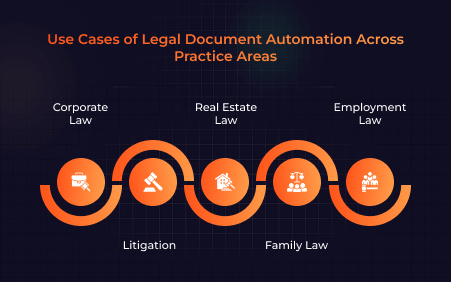
Legal document automation excels at generating initial drafts of pleadings and motions by combining deep analysis of case facts with substantive law and applicable procedural rules.
8. Legal Notices
AI creates legal notices by identifying the issue, relevant law, and required demand. It generates properly formatted notices with correct language timelines and references reducing drafting effort and errors.

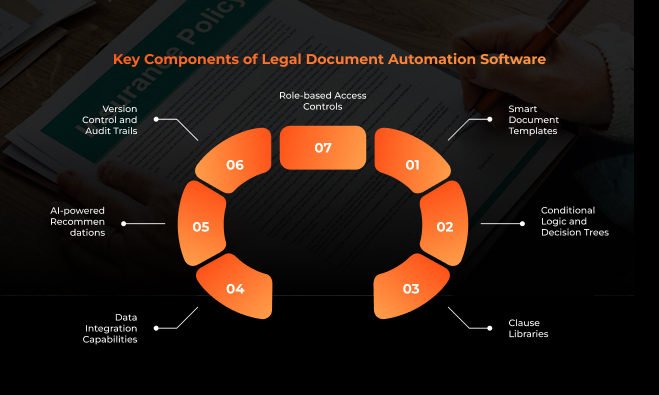
Must-Have Features of Legal Document Automation Software
Here are some of the must-have features that can be expected from legal document automation software –
1. Template Library
In a legal document automation software; template library is a centralized repository of pre-approved, standardized document templates such as service contracts, wills, NDAs, etc. These ensure that documents start from a compliant and current foundation.
2. Dynamic Data Fields
These are placeholders within a template; that are automatically populated with specific information (like client names, dates, case numbers) from a database or a simple questionnaire.
3. Conditional Logic
This feature allows a single template to cater to multiple scenarios by using “if/then” rules to adjust a document’s content based on specific inputs. It alters the document’s content based on answers in a dynamic questionnaire.
4. E-Signing & Digital Signatures
A legal automation software comes integrated with electronic signature capabilities. The feature enables documents to be sent; signed, and returned digitally. This makes the document legally binding; without the need to print or scan the document.
5. Compliance & Audit Trail
The compliance and audit trail tracks every interaction with the document from creation and editing to sending and signing. An immutable audit trail provides a complete history; of who did what and when; demonstrating regulatory compliance; and ensuring accountability.
6. Workflow Automation
This automates the routing of documents through various stages of their lifecycle; drafting, review, approval, signature, storage, etc. It can assign tasks; send reminders, and manage the sequence of operations, ensuring that the right people can access the document at the right time.
7. Integration with Other Systems
Legal document automation software development; can help you have a tool that connects with existing software – such as CRMs, Salesforce, case management, etc. With this integration, you can share data seamlessly and avoid data silos.
8. Clause & Content Library
Beyond full templates, this is a centralized, version-controlled repository of individual pre-approved legal clauses and content snippets. Lawyers can easily drag and drop or insert these standardized building blocks into a document.
Benefits of Legal Document Automation for Law Firms
Let’s have a look at some of the benefits of legal document automation for law firms –
1. Saves Time and Boosts Productivity
Legal document automation removes repetitive drafting. Hence, lawyers can draft documents faster and spend more time on legal thinking. They can further prioritize client matters instead of formatting and copy-paste tasks.
2. Reduced Errors
AI in legal document automation relies on fixed logic and approved templates. This reduces missing clauses and typing errors. As a result, more accurate documents are created, and they stay consistent.
3. Lowers Operational Costs
With legal document automation, firms reduce manual work and minimize time spent on routine tasks.
As a result, attorneys spend fewer billable hours on repetitive activities.
Moreover, as automation increases across workflows, firms streamline administrative processes and significantly lower overall operating costs.
4. Better Compliance and Risk Management
There is an increased use of advanced technologies such as AI in legal document automation. This facilitates adherence to predefined legal rules which further ensures regulatory compliance as well as risk reduction caused by outdated or incorrect legal language.
5. Enables Scalability
Law firms can handle more cases without hiring additional staff. Legal document automation, allows the team to manage growth while maintaining speed as well as quality of services.
6. Faster Client Turnaround
AI in legal document automation reduces both document drafting as well as review time. It helps generate and finalize documents faster, letting clients receive deliverables promptly.
7. Improved Client Satisfaction
Clients receive legal documents, contracts, and agreements on time. Automation ensures all legal details are consistent. This reduces errors and builds trust.
Role of AI and Machine Learning in Legal Document Automation
1. Analyzing Past Documents
Automated legal documents use Natural Language Processing and machine learning to process and analyze vast historical document repositories; including contracts, case law, internal memos, etc. The algorithms identify patterns; trends and connections across thousands of documents.
2. Suggesting Clauses
Lawyers can use pre-built; AI-powered templates that automatically populate with relevant data. Based on the document’s purpose; the system can suggest specific clauses from a firm’s internal clause; library or industry standard.
3. Flagging Risks
Automated legal documents use AI algorithms that are trained to spot non-standard terms, inconsistent language, missing information, or clauses. The systems alert legal teams if it perceives any violations and resolves much before they escalate.
4. Improving Language Clarity
These tools convert complex legal language into simple terms that clients can understand easily. They also check documents for spelling mistakes; grammar errors, and unclear sentences, helping improve clarity, accuracy, and overall document quality.
5. Learning from Lawyer Feedback
AI systems produce automated legal documents that learn from how lawyers use them. When lawyers edit or reject suggestions; the system learns their preferences. Over time, it adapts to firm standards and stays updated with changing laws and legal practices.
Best Legal Document Automation Software to Inspire Your Own Automation Solution
1. Clio Draft

Clio Draft is an AI legal drafting software for document automation, online templates, and cloud-based court forms. It lets users streamline their document tasks, gather client information efficiently, and convert Word files into fillable templates. Users can create templates that include custom variables and pre-drafted clauses.
2. Smokeball

Smokeball AI is a suite of generative AI tools designed to help law firms streamline a variety of operations such as information gathering, managing client intake, and drafting correspondence.
3. MyCase
MyCase is a legal practice management platform; that brings together tools for case management, scheduling, billing, document storage, and client communication, all in one place. It is focused on helping small to midsize law firms reduce their administrative overhead and improve client service.
4. Knackly

Knackly is a legal document automation platform that offers client-facing guided interview capabilities. As a legal client intake software, its process is designed to streamline the collection of client information and automate document creation. Clients can upload necessary documents directly into the intake process.
5. TypeLaw

With legal client intake software development, you can create platforms like TypeLaw. TypeLaw’s proprietary AI formats briefs with local-rules compliant tables, accurately hyperlinked citations, and much more. A briefing expert performs a final quality check to make sure everything is on point.
Why Do Law Firms Need Custom Legal Document Automation Software Today?
In a law firm, drafting routine documents is a tedious process. Documents such as contracts, notices, agreements, compliance papers, etc follow fixed patterns. In a traditional scenario, lawyers might be required to rewrite them repeatedly. Legal document automation software development solves this issue. Automated legal documents streamline the processing of these documents.
Instead of starting from scratch, legal professionals can generate documents by answering a few structured questions. This saves time and reduces stress. Moreover, lawyers can focus more on strategy, advice and courtwork instead of spending hours on formatting the documents.
What’s even better is the fact that legal document automation, especially using advanced technologies such as AI and machine learning, reduces the scope of errors since it uses approved templates. Additionally custom legal software easily integrate with existing systems, implying that client data entered once can be reused across documents.
Future Trends in Legal Document Automation
1. More AI-driven Drafting
AI in legal document automation will better understand complex legal nuances, letting them generate first drafts of complex documents from scratch within minimal human input. Not only will the technology generate text but will also analyze vast datasets to anticipate potential legal issues. Apart from that, AI will ensure that all generated documents adhere to best practices and legal requirements.
2. Voice-enabled Document Creation
In addition to AI, document automation for legal will also use voice recognition, where voice commands could be used to assign tasks, manage document workflows, and retrieve information from connected systems. This feature could be most beneficial for users who have accessibility issues, such as those with physical disabilities.
3. Predictive Legal Insights
AI for legal research will be able to better predict the potential success of different legal arguments as can be seen in AI case law analysis. It would compare the arguments with historical legal outcomes; ensuring a thorough risk analysis. Lawyers will be able to use insights to tailor their case strategies.
4. Deeper System Integrations
Future AI legal tools will move beyond standalone applications; becoming seamlessly embedded into a firm’s existing technology ecosystem; to create unified and efficient workflows. The software will embed AI insights into collaborative platforms; facilitating better teamwork; version control, and coordinated reviews among legal teams.

Why Choose A3Logics for Legal Document Automation Software Development?
A3Logics offers AI development services, focused on real legal outcomes. We help law firms reduce drafting time, control risk, and standardize documents through practical and reliable automation.
As a legal software development company; A3Logics delivers secure and scalable legal document automation systems. Our solutions are built for compliance, ease of adoption, and long-term operational efficiency.
Conclusion
As has been established in this post, AI in legal document automation can easily simplify document-intensive work and, in fact, make the processes faster and error-free. With the inclusion of technology, lawyers can now free themselves of low-value administrative jobs and focus more on legal strategy and client counsel. In the end, it would be safe to say that the implementation of legal documentation software is a fundamental necessity for modern legal practice.