
The average human attention span is approximately 8.25 seconds, shorter than a goldfish’s. Consumers seek content that they can digest in this timeframe. This also implies that the content has to be crisp, relevant, and engaging at the same time. Short-form videos pander to this.
And that’s where short video app development Services opens up enormous opportunities for those who wish to create platforms like Instagram Reels, TikTok, YouTube Shorts, etc.
Impact of Short Video Apps on Social Media and Entertainment
Short videos highlight quick tips, key moments, or entertaining content in 10-30 seconds, capturing user attention immediately and, hence, have impacted social media and entertainment in significant ways –
- The algorithmic nature of short video platforms that personalize content recommendations.
- Users can consume a wider range of content across categories like entertainment, documentaries, lifestyle tips, etc.
- Powerful marketing tool for brands and creators to showcase their content to relevant audiences in a short span of time. In return, they can generate sales and make their brand reach a wider audience.
- Short video apps offer a platform where creators of all levels can thrive and express themselves creatively.
- Short-form videos have played an important role in shaping cultural trends and viral moments through memes, challenges, etc. Not mention the speed at which the content goes viral across a widespread audience.
If short video app development seems like an opportunity that you can capitalize on, this is the post for you. In this post, we’ll discuss the factors you should consider for short video app development – the features, the scope of revenue generation, the cost involved, etc.
How Short Video Apps Work?
Short video apps work by providing a platform for users to create, edit, and share short-form videos (lasting for a few seconds to a minute). They can add music, filters, text overlays, effects, and other elements to enhance videos.
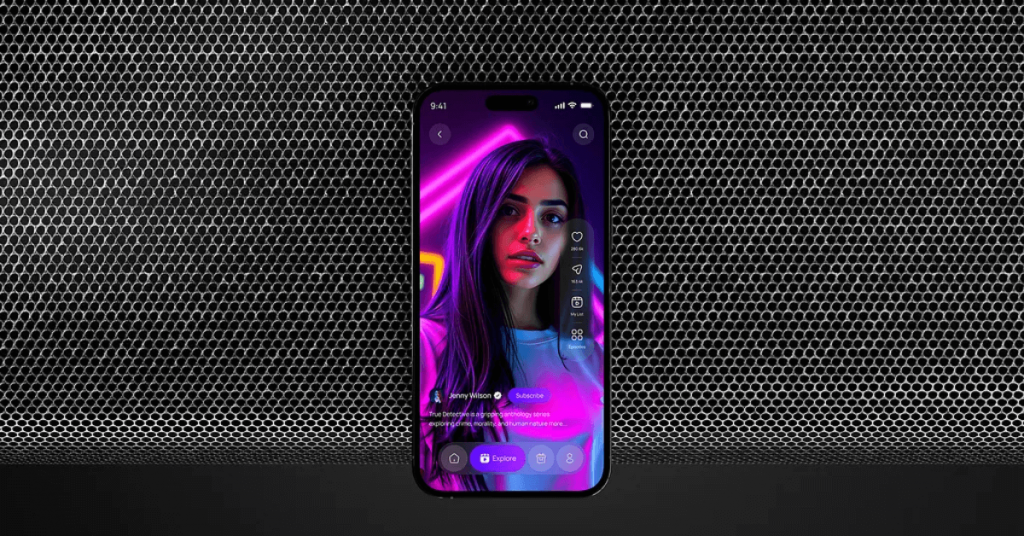
As for content curation, the short video apps use algorithms to curate content based on trending topics and user interests. Apart from creating and editing content, users can browse through video content across various categories.
Short video apps also let creators and users share their content with others and allow them to show their reactions via likes and comments, among other options. Some short video apps also offer monetization options, such as ad revenue and sponsored content.
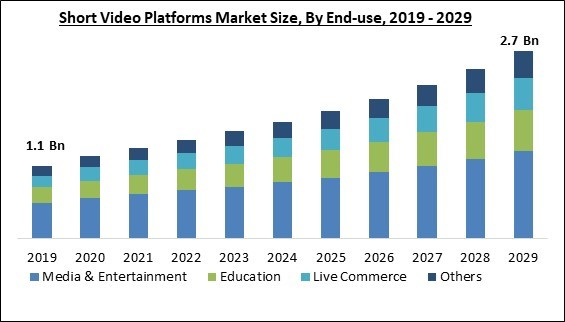
Market Overview – Key Statistics and Trends in the Short Video App Market for 2025
- Videos with a duration of under 90 seconds retain 50% of viewers.
- Short video platform market size is projected to grow from $1.97 billion in 2024 to $2.22 billion in 2025.
- People open short video apps over 8 times daily.
- Platforms like TikTok, YouTube Shorts, and Instagram Reels boast of 1.5 billion, 1.5 billion, and 800 million monthly active users, respectively.
- AI-generated content accounts for 52% of Instagram Reels and TikTok content.
- People spend an average of 1 hour and 16 minutes daily watching short-form videos.
- 78% of users say they’d like to learn about a product or service by watching a short video.
- Ad-revenue from short-form videos is projected to surpass $10 billion.
- By the end of 2025, 82% of online content is expected to be video, with short-form video content leading the charge.
- In 2024 alone, it was predicted that 47 million people in the U.S. made purchases on Instagram.
Most Popular Short Video Apps To Inspire Your Video Sharing App Development Journey
A comparison of top apps in the market:
TikTok – Social Video App

Owned by Chinese company ByteDance, TikTok has already crossed the 2 billion user mark. It was one of the first to introduce short-form videos. Users can create videos ranging from a few seconds to a few minutes.
They can create, edit, and share videos and add special effects and filters. One of the reasons that the platform is popular is that the algorithm learns user preferences and provides a tailored experience. No doubt, it has inspired many tech giants to develop short video apps with features similar to TikTok.
Instagram Reels

Next on the list is Instagram. It boasts over 2.5 billion active users. On Instagram Reels, users can create vertical video clips of up to 3 minutes in length. Reels let users add background music, choose from a myriad of filters, and share content seamlessly on Instagram and other platforms. If you ever want to keep a record of your favorite Instagram stories, you can make use of an Instagram Story Downloader, which allows you to download them directly.
It also offers a host of powerful editing tools with which users can refine their video content.
YouTube Shorts

YouTube had long been hailed as a platform where viewers could enjoy long-form content. Things changed in September 2020 with the launch of YouTube Shorts. Again, the platform lets users create and post vertical 60-second videos directly from their smartphone. The platform enjoys a user base of around 2 billion monthly active users.
Key Features to Consider in Short Video App Development
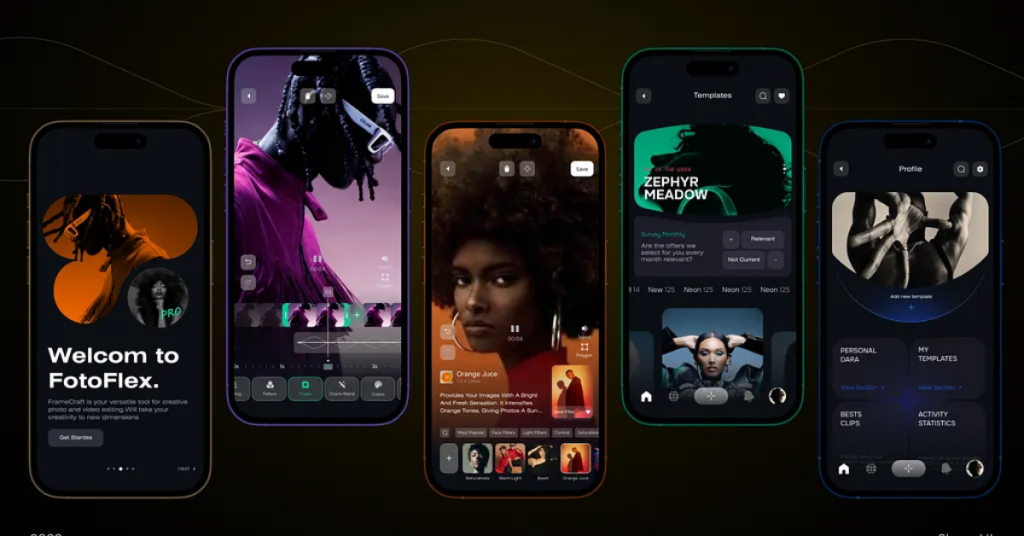
1. User Registration & Profiles
> Sign-Up/Login
In this section, the user either signs up on the short video app by creating a new account or logging in with an existing one. Sign-up typically involves furnishing credentials like username/email and password. The login, on the other hand, uses these credentials to grant access.
> Profile Creation
After the sign-up/ login process, users create a profile on the short video app. They do that by choosing a profile photo, name or nickname, a short bio that tells about their personality, and other information. The profile creation process helps users personalize their experience and establish their unique identity on the platform. Adding the best link in bio tools into this setup can further enhance engagement by guiding followers to curated content hubs.
> Privacy Settings
These are the controls user have over their content and data within the app. More specifically, through these controls, users can decide who watches their profile or content and manage their data. The privacy settings help users choose who can see their profile, who can watch their videos, who can use their data, and even manage location sharing.
2. Video Editing & Creation Tools
> Recording Options
In a short video creation app, there are three aspects that a user can capture: audio, video, and the screen of the device. The app provides a myriad of tools, using which users can record video through the device camera, record the device screen, and record audio. This way, they can create videos for different purposes, from presentations to self videos or even tutorials.
> Editing Tools
Users can edit the created videos using the editing tools to modify or enhance their video content. They can perform basic editing like trimming, cropping, or merging videos, and adding filters, effects, and text overlays. Not just video, using the editing tools, users can edit audio of the content as well. They can mix audio, add filters, enhance volume, etc.
> Music Integration
Music integration in short video app development refers to combining music with video content for a cohesive audio-visual experience. The process involves selecting apt music, editing, and syncing it with video clips to increase the overall impact of the content.
> Video Speed Control
This ability refers to adjusting the playback speed of video clips. The feature allows creators to tweak the pacing of their videos, for instance, slowing videos when emphasis or cinematic effect is needed or speeding up sections to demonstrate dynamism.
> Stickers & Emojis
Users can highlight product features, emphasize points, and express emotions using animated GIFs or static images. These visual elements add personality and enhance video content, visual interest, and engagement. A classic use of stickers and emojis can be seen to depict reactions or responses in a video.
3. Video Sharing & Social Features
> Upload & Share
Once someone has created a short video, they can upload it to the app and share it with the people they want. Video sharing apps also allow users to share the videos on multiple social media platforms simultaneously.
> Hashtags & Tags
In short video app development, the integration of hashtags and tags is essential as both these components are essential for social interaction and content discoverability.
Hashtags “#” categorize content and let other users find videos based on interests and topics; tags “@” are used when a user wants to mention other users in a video, enabling direct engagement and connection.
> Comments & Likes
Comments and likes are essential to fostering engagement and user interaction. The kind of comments that appear on the video and the number of likes obtained help find if the audience is reacting positively to a video.
While likes act as a form of validation and provide a quick overview of how well received a video is, the comments allow viewers to express their opinions, thoughts, and reactions in a more detailed manner.
> Shareable Links
This feature in the short video app allows users to generate URLs for sharing their created videos on multiple platforms, not just social media platforms but also through email.
Shareable links are essentially shorter versions of longer URLs that let users access the video on any device with an active internet connection.
4. Video Feed & Discovery
> Personalized Feed
While considering short video app development, consider integrating this advanced feature. The personalized feed uses algorithms to display content tailored to an individual’s interests and preferences instead of showing universal content.
It’s the same algorithm that also takes into account the user engagement metrics that we discussed a while ago, like likes and comments.
> Trending Videos
Trending videos appear on the prime section of the platform, which attracts a large number of viewers who are actively seeking engaging content. As someone who’s getting a short video app developed, you should include a trending video section, using which video creators on your platform will be able to reach a broader audience, increase visibility, and potentially gain more followers.
> Search & Filters
Various search and filter options make it easy for users to find and explore content that interests them. In a dedicated search area, users can type phrases or keywords related to the video content they are looking for.
There are short video apps that place search areas on individual creators’ channels so that viewers can easily find content from those specific creators. Apart from search options, you can also include filters, using which users can find videos based on content type, duration, trending videos, upload date, etc.
5. Monetization Options
> Ad Integration
This refers to incorporating advertising into the application to generate revenue. Ads can be integrated into various formats, such as video ads, banner ads, or interstitial ads, without hampering the user interface or user flow.
> In-App Purchases
Through this monetization strategy, video creators on your platform can earn money when users purchase features, virtual goods, or content within the app. As a developer, you can generate revenue by offering additional value.
> Creator Partnerships
As creators become significantly popular, brands relevant to their niche may approach them for collaboration. Through this section, creators can partner with apt brands and integrate their products in the videos for a fee.
> Subscription Models
As a popular monetization strategy for short video apps, you can add subscription models when developing short video apps. Here, you can ask users on your platform to pay a recurring fee to access the app’s features or content.
6. Notifications & Alerts
> Activity Alerts
These are notifications that provide personalized updates to users based on their actions. The app’s alerts offer users reminders or information about their activity, events, or interactions.
> Content Updates
Content updates can be added to increase user engagement. Users are notified about new videos and content additions to the platform through methods like push notifications and in-app notifications.
> Trending Topics
Users receive notifications and alerts about the most viral content or topics on the short video app. These can appear in the form of engagement prompts, new content, and user activity reminders.
Users may receive alerts of new content published by followed creators on specific topics. They may even receive recommendations about the latest live streams or may be encouraged to like, share, or comment on a video.
7. User Engagement & Social Networking
> Follow/Unfollow
As a way to increase user engagement, follow/unfollow buttons are added to the short video app. The follow button is indicative that users have subscribed to a creator’s channel, and their videos will regularly appear in their feed.
On the other hand, the unfollow button is just the opposite; it is used to unsubscribe to a creator’s channel so that their content no longer appears in the feed. Also, by unsubscribing, users no longer receive alerts of new content from a creator.
> Collaboration Features
This expands the platform to users, who can create content with their favorite creators and interact with other users. They can also share the content that they have made in collaboration with other users. A classic example is the “Duets/ Remixes” feature in TikTok and Instagram Reels that allows users to create videos in partnership with a creator.
> Direct Messaging
Direct messaging, or DMs, is a private one-on-one or group messaging feature. This means that a user can send private messages to a creator, and the communication occurs only between the sender and the recipient. The messages are not public. The aim of direct messaging, or DMs as they are most commonly called, is to foster a more personalized approach where creators can receive personal feedback on their content.
8. Security & Moderation
> Content Moderation
Content moderation ensures user-generated content complies with legal requirements and platform guidelines. This includes removing inappropriate or offensive content while maintaining the app’s reputation and protecting users.
> Abuse Reporting
An important feature of short video app development is abuse reporting. This allows users to flag inappropriate content that violates guidelines or the platform’s policies. This includes harmful, offensive, illegal, or otherwise inappropriate content.
> Age Restrictions
Age restrictions often involve verifying a user’s age before granting access to certain content or even features. In this regard, content moderation also involves implementing reporting mechanisms and filters to spot and remove content unfit for children, such as violence, illegal material, or sexual content.
9. Analytics & Insights
> Video Performance Analytics
As the name suggests, video performance analytics tell how video content is performing on the short video app. Here, users can get insights on views, conversion rates, user retention, watch time, engagement, completion rates, and viewer demographics, amongst other metrics. Using these metrics, users can identify patterns, trends, and other insights into how videos are performing.
> Engagement Stats
As we have established at various points in this post, user engagement is key for short video apps. Integrating engagement stats in short video apps helps ascertain how users are interacting with the platform and the published content. These stats can be used to identify areas that need improvement.
10. Performance & Scalability
> Fast Upload/Download
Fast upload and download speeds are crucial for scalability and performance when developing a short video app development platform. Both these aspects minimize buffering and loading times and enhance user experience. A seasoned mobile app development company can build short video apps that facilitate fast video uploads and stream videos quickly using technology like adaptive streaming, robust cloud native infrastructure, and efficient video compression.
> Scalable Infrastructure
Talking of scalability, a robust short video platform should be developed in such a way that it is able to handle increased workloads and user demands without compromising performance.
> Video Compression Techniques
A well-developed short-form video app offers advanced video compression techniques, which allow it to perform well on fronts like faster upload speed, smooth playback, and supreme performance on slow networks. The video compression techniques also prevent the app from experiencing significant lags.
11. Cross-Platform Support
> Multi-Device Compatibility
Knowing that your short video app will be downloaded across devices varying in screen size and resources, it should function seamlessly and effectively regardless of the device type or size. This implies that all the features of your short video app should work fine whether on a smartphone or on a desktop.
> Syncing Across Devices
This feature ensures that all user data, such as accounts, videos created, and account preferences, are synced across all the devices used by a user. Syncing also ensures that any changes made to the app or the video are automatically reflected on other synced devices.
12. Localization & Globalization
> Multi-Language Support
One of the best features of short video app development is multilingual support, which makes the app accessible to various users regardless of the language they speak. This feature helps remove language barriers that users may otherwise face. With multi-language support, users can access the app’s features in their preferred language.
> Region-Specific Content
With this feature, you can tap into diverse markets by tailoring content according to culture preferences, interests, and language. You can also tailor ads according to user-specific location and tap into influencer marketing opportunities in specific regions.
Steps in Short Video App Development
If short video app development looks like an enticing opportunity, here’s a step-by-step guide to creating a short video app, from planning to launch –
Step 1 – Define App Idea and Target Audience
The first step in creating a short video application is to define its purpose. You need to have a clear idea of what features you want to offer in the app, the potential users, and the problem your app will solve. At this stage, it is recommended that you research the existing competitors to identify your USP and where you can gain a competitive advantage. You might also consider creating a proof of concept that will help you validate the feasibility of the concept.
Step 2 – Choose The Right Technology Stack
This step involves choosing the right technology stack and tools for your app. Decide on what frameworks and languages you want to use and the platforms you wish to support (Android, iOS or Web). Choose the front-end and the back-end services and databases that you want to use, and what third-party SDKs, and APIs you want to integrate.
Step 3 – Design UI/UX
Next, create a wireframe or prototype to determine how your app will look and work. Many companies offer short video app development services, where they even design the user interface and user experience of your app. They consider the color scheme, layout, fonts, icons, buttons, and other visual elements of the app. At this point, you also need to consider the user flow, feedback, interaction, and animation you’ll use in the app.
Step 4 – Develop Front-end and Back-end
Here, you’ll code your app’s functionality and logic using chosen frameworks and programming languages. You also need to connect your app to backend databases and ad services using SDKs and APIs. The front and back end are essential to ensure that your app can accommodate various features such as video encoding/decoding, filtering, effects, face detection, hashtags, data storage, data analysis, etc.
Step 5 – Test and Launch
This phase can be divided into three parts. The first is where you test your app thoroughly and remove any bugs and issues that may hamper user experience and security. Once you are sure the app is perfect for the end-user, the second phase is where you launch the app on platforms like the App Store (iOS) and Google Play Store (Android). Apart from launching the app on popular app stores, you also need to market your app effectively to attract more users and reach your target audience.
Choosing the Right Monetization Model for Your Short Video App
Here, we will quickly discuss some useful tips on selecting the most suitable revenue models for short video apps. When choosing the right monetization model for your short video app, consider your business goals and the app’s features.
Consider this example –
If you aim to build a loyal creator community, a revenue-sharing model might be apt. However, if you are targeting premium content, a subscription or pay-per-view model could be better. Once your short video app starts getting consistent user engagement and a decent watch time, you can start introducing nonintrusive ads.
Let’s now quickly dive into some popular revenue models or monetization models for your short video app –
> In-App Advertisements
You can display ads from sponsors on your app in lieu of a fee. It can be a scalable revenue stream, as the number of ads displayed can increase with the increase in user-base.
> Subscription-Based Model
You can offer premium features or content for a recurring fee (weekly, monthly, annually, etc.). This model is recommended if your short video-sharing app offers advanced features such as AI-based recommendations, advanced filters, a large library of royalty-free music clips, several trending templates, etc.
> In-App Purchases
There are several ways you can earn from in-app purchases within your app. The in-app purchases let users of the app buy extra features or content from within the app. For example, tipping favorite creators, unlocking behind-the-scenes clips, for creators you can offer advanced filters, AI-based features, etc for a price.
> Sponsorship
Collaborate with relevant brands or help creators collaborate with relevant brands.
Technology Stack for Short Video App Development
The tech stack is of utmost importance as it helps deliver results. Here’s a detailed discussion of essential technologies used in building short video apps –
| Android | Java and Kotlin |
| iOS | C or Swift |
| Hybrid | Flutter, Xamarin, and React Native |
| Framework | Android SDK, Android Studio for Android Short Video App Development, and Xcode, and iOS SDK for iOS Short Video App Development |
| Database | MySQL, MongoDB, and PostgreSQL |
| Cloud Storage | Amazon S3, Microsoft Azure Blob Storage |
| Video Processing | Zencoder, FFmpeg, Wowza Streaming Engine, Azure Media services, AWS |
| CDN (Content Delivery Network) | Akamai, Cloudflare, Amazon CloudFront |
| Analytics (Measure app’s performance) | Google Analytics, Crashlytics, Firebase Analytics |
Advanced Technologies in Short Video App Development
Insights on cutting-edge technologies like AI, AR/VR, and machine learning that enhance app features –
> AI Recommendations
When developing short video apps, the integration of AI-based recommendations can be used to personalize user content based on their behavior. Using AI, users can find content that goes hand in hand with their interests.
> Machine learning Algorithms
On the lines of AI, Machine Learning (ML) can be used to personalize user experience. Additionally, ML algorithms can be used to analyze user viewing likes, history, comments, and other data to understand their preferences. It can be used for more efficient categorization of videos, making it easier for users to explore content. ML can also be used to automate tasks like caption generation, video editing and content creation as a whole.
> AR
When creating a short video app that aligns with modern-day creative needs, include AR (Augmented Reality) in apps. This can make the experience more immersive with interactive filters, and real-time interaction between users and their environment. Plus, using AR users can also incorporate 3D models and animations to make more immersive and engaging content.
> VR Technologies
During short video app development, you can also include VR elements. VR, or Virtual Reality, can be a great way for users to interact with their content from the first-person perspective. They can explore their scenes or any part of their content by creating 360-degree panoramas and exploring scenes from any angle.
Cost of Developing a Short-Video Mobile App
To get an estimate of how much short video app development will cost, you can refer to this exhaustive post. Meanwhile, here’s a breakdown of development costs, including factors that influence pricing.
Feature Complexity
Features are what make the app. That said, an app will cost you more if you intend to include advanced features like AI-assisted suggestions, inclusion of AR/VR elements, live streaming, etc.
Choice of Platform
As compared to native apps that require distinct lines of code for individual platforms, cross-platform apps are cheaper. These can also be developed fast as a significant amount of code, including the backend, can be reused.
UI/ UX Complexity
A more visually appealing short video app with custom elements, animations, etc, would certainly cost more since it would require a more complex user experience and user design.
Size Development Team
Hiring an experienced (and larger) team can reduce development time, but it will cost more, as compared to a smaller team. However, the development time may increase.
Location of The Development Team
The cost of developing a short video app may also vary depending on the location of the developers. This is because of variations in labor costs and other regional factors. For instance, developers in regions with higher cost of living and more established tech industries may demand more.
Challenges in Developing a Short-Video Mobile App
Here are some common obstacles and considerations during the app development process specific to short video app development –
> User Acquisition and Retention
There already are some big players in the short-form video generation platform market. Only if you develop an app with a unique proposition can you expect to acquire a widespread userbase and etain them in the long run.
> Video Encoding and Decoding
The app should be able to accommodate various video resolutions, formats, and aspect ratios without compromising the quality or user experience.
> Adapting to Algorithms
Social media platforms and search engines regularly update their algorithms. As a developer, you should have strategies ready to ensure that content remains relevant and visible.
> Scalability
The infrastructure of the short video app should be such that no matter how many short videos are uploaded, storage or upload speed should not pose issues.
> Security and Privacy
The app will contain an enormous amount of confidential user data. To protect it, you must enforce strong military-grade data protection systems to secure the data from unauthorized access. Simultaneously, your app should comply with various data security norms.
Conclusion
Investing in a short video app development can be a great strategic move due to the rapidly growing market for bite-sized, engaging content. Such apps offer high engagement rates, myriad monetization opportunities, and the ability to build a strong and loyal user base. In this post, we have touched upon all the facets and provided insights using which you can develop a short video app tailored for success.
We have discussed the essential features, the trending technologies, the factors affecting the cost, and various other elements that will help shape a successful short video app and turn your vision into a high-performing, user-loved platform.