The emergence of artificial intelligence has radically changed how people and organizations make, edit, and enrich digital imagery. From automating background removal to creating hyper-realistic images from text prompts, AI Image Editor Apps have changed the creative process and are reducing entry points to professional-quality design. Analysts expect that the global AI image enhancer market will have a CAGR of 34.6% from 2025 to 2034, and will reach $50.7 billion by 2034.
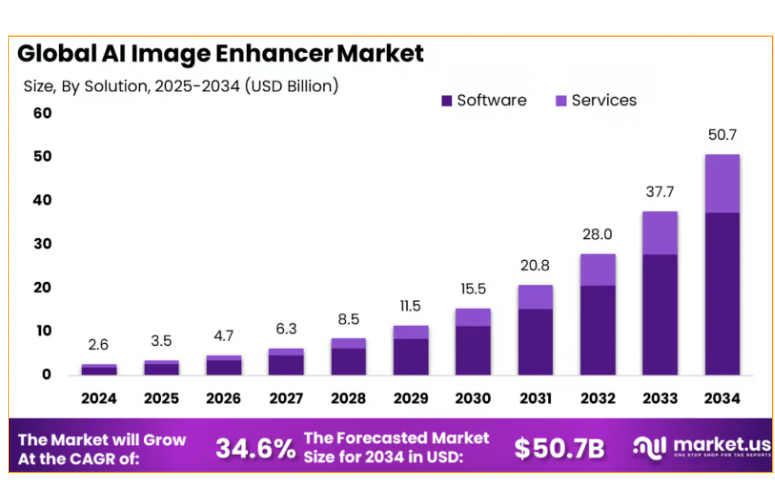
Source: Market.us
Technology leaders, developers, and strategists for digital products are now no longer asking if AI-powered editing will take over, but instead how to create sustainable, competitive products in this quickly evolving, growing space. In this blog, we will cover the key considerations for developing an AI Image Editor App from scratch, proven frameworks, market context, and more. Let’s jump in!
What is an AI Image Editor App?
An AI Image Editor App is a software application that is typically deployed on either mobile, desktop or web platforms that leverages artificial intelligence and machine learning models to either automate or augment traditional image editing tasks. Unlike more traditional photo editors like Photoshop or GIMP, AI-powered solutions rely on deep learning algorithms which are able to use content aware transformations.
Features are:
- AI text to image generator that can generate a new image from natural language prompts.
- Automated inpainting and outpainting, where missing parts of the images are filled using AI.
- High resolution upscaling using super resolution models.
- Keeping the consistency of design in image generation to fulfil brand specific needs.
These apps are developed for both consumer markets and enterprise markets.
For instance, a retailer engaged in ecommerce can take advantage of the AI Photo Editor App to quickly remove backgrounds from product photos across thousands of images. This would result in a vast amount of manual edits being saved each year.
AI Image Editor Market Statistics
- The photo editing app market is projected to move up to USD 402.37 million by 2032, a figure that speaks about the extent of the impact of generative AI tools like DALL·E, Midjourney and Stable Diffusion on the demand for an easy app-based editing experience.
- Stability AI, the brain behind Stable Diffusion, has raised over $100 million in Series A funding, which is a clear indication of the strong faith investors place on the platforms for AI driven creativity.
- Gartner forecasts that more than 80% of businesses will use generative AI to produce digital content, such as image editing, by 2026.
These statistics highlight the urgency for businesses, startups or any Custom App Development Company to enter this space in a meaningful way with an improved experience.
How Generative AI is Shaping the Future of Image Editing Apps?
Generative AI has revolutionized the standard editing process into an intelligent, interactive experience:
1. Manual to Prompt-Based Editing
With layout layers and dozens of tools, editing is a world apart from issuing a statement to a text to AI image generator… “make the sky sunset orange” or “add a vintage film look”.
2. Hyper-personalization at Scale
AI models learn user preferences and provide a selection of tailored edits, surfacing edits that are typical in marketing campaigns that require custom visual graphics for numerous demographics.
3. Democratization of Design
Non-designers can use AI Photo Editor Apps to create artifacts that seem to be designed by a design professional therefore disrupting the playing field between small and big businesses.
4. Expansion Into New Media Types
Visionary companies like Runway ML are aggressively diversifying from static image areas into artificial intelligence-based video editing, spatial computing and AR/VR experiences that help with design.
Top AI Models Used in Image Generation and How to Integrate Them
1. Stable Diffusion (by Stability AI)
Stable Diffusion is undoubtedly one of the most widely used open-source diffusion models and is available for free. Stability AI is built to scale but also offers flexibility. The model can be downloaded and integrated locally or through APIs. Therefore, it is a natural fit for an app requiring a customizable workflow.
Suppose you use the default weights, available pre-trained weights, along with developer-designed extensions (for example, ControlNet). It can be fine-tuned to niche cases e.g. Fashion, E-Commerce, and/or product imagery. If you use it using an on-premise install, you will benefit from affordability as well since you do not have to rely completely on cloud GPUs.
2. DALL·E 3 (by OpenAI)

DALL·E 3 is the model that defines some of the highest level AI text to image generator applications available today. The model’s strength comes from a robust understanding of natural language, which makes it a sound candidate for AI Photo Editor Apps. It uses Software as a Service (SaaS), where users want to convert the prompt into a visual as accurately as possible.
Integration through the OpenAI API is straightforward, and developers will be able to add text-to-image generation and image editing to mobile or web applications. This model is best used for applications relying on consistently accurate quality outputs of images across a variety of prompts.
3. Midjourney (via Discord)

Midjourney has received a lot of worldwide attention among digital artists and designers in part for its highly stylized outputs and strong creative community. Currently, the majority of the access is through their Discord platform. They also have many developers experimenting with social-first design models and other features.
4. Runway ML (Gen-2 for Video/Image)
Runway ML has transformed the image editing space by crossing into video generation and editing functions. Their Gen-2 models now allow users not just to create still images but to transform and animate them, giving endless opportunities for any creative professional in advertising, marketing, and film.
Runway provides API access to develop any cross-media functionality you may need in an AI Photo Editor App. For teams wanting to differentiate their platforms with video pipelines or AI powered motion graphics, Runway ML offers potential for integration possibilities.
5. Google’s Imagen (Vertex AI)

Imagen is a diffusion model developed by Google and its purpose is to generate photorealistic images of the highest quality. Unlike the majority of open-source tools, Imagen is inextricably linked with Google’s Vertex AI ecosystem and is thus optimized for the enterprise setting since it includes enterprise governance, compliance, and scalability as its design principles.
For companies developing an AI Image Generator App, where compliance, regulations, and enterprise IT are the most important considerations, Imagen is the accepted enterprise-ready solution.
6. SDXL (Stable Diffusion XL)
SDXL introduces the next generation of Stable Diffusion by offering improved realism, detail, and resolution. It is already in use as a stable, production-ready delivery method for high-end editing functionality in commercial platforms like ClipDrop.
If you are a developer building an AI Photo Editor App, SDXL is especially valuable when the outcomes need to meet professional image outputs. This may include print-quality media or advertising material requirements like posters or large-format graphics.
Must-Have Features in an AI Image Editor App
| S. No. | Feature | Description |
| 1 | Text-to-Image Generation | Convert natural language prompts into images using integrated AI models. |
| 2 | Image-to-Image Editing | Modify or enhance existing images while preserving core elements. |
| 3 | Inpainting & Outpainting | Fill missing areas or extend image boundaries seamlessly. |
| 4 | AI Upscaling & Enhancement | Improve resolution and clarity without quality loss. |
| 5 | Negative Prompts | Exclude unwanted elements from generated outputs. |
| 6 | ControlNet Integration | Provide precise structural guidance (pose, depth, edges). |
| 7 | AI Style Transfer | Apply artistic or branded styles to existing visuals. |
| 8 | Face & Body Refinement | Enhance portraits with natural corrections to skin, expressions, or form. |
| 9 | Background Removal | Automatically detect and remove backgrounds for clean exports. |
| 10 | Brush Tools | Give manual control for fine-grained AI-assisted edits. |
| 11 | Real-Time Previews | Show instant previews of edits before final rendering. |
| 12 | Prompt History & Templates | Save and reuse prompts for consistent creative workflows. |
| 13 | Batch Processing | Apply edits or generate multiple images at once. |
| 14 | Multiple Export Formats | Support PNG, JPEG, TIFF, PSD, and other formats. |
| 15 | Metadata & Watermarking | Automatically add copyright, licensing, and branding info. |
| 16 | Direct Social Sharing | One-click publishing to Instagram, LinkedIn, Twitter, etc. |
| 17 | 3D Image Generation | Create depth-aware, spatially accurate 3D visuals. |
| 18 | AI Video Editing | Enhance and generate motion graphics or video frames with AI. |
| 19 | Voice-to-Image | Generate images from spoken commands for accessibility. |
| 20 | AR/VR Integration | Blend AI-generated visuals into immersive AR/VR environments. |
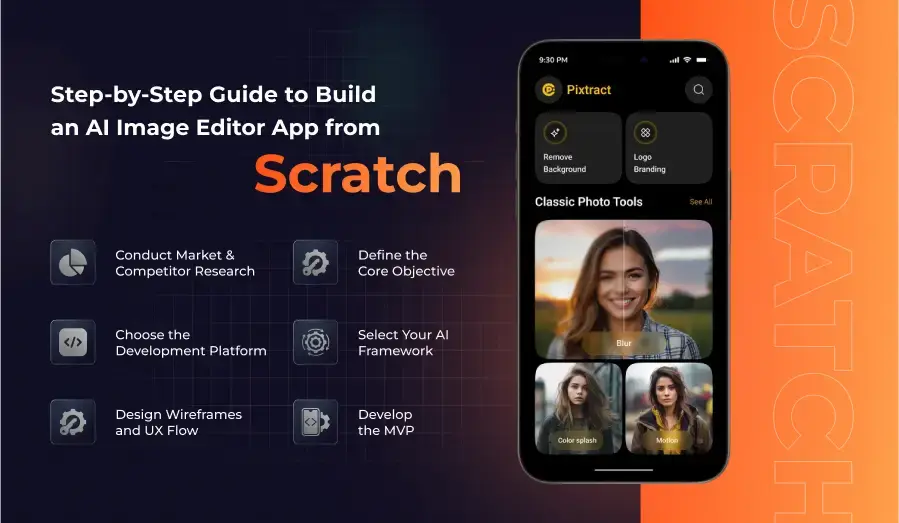
Step-by-Step Guide to Build an AI Image Editor App from Scratch
1. Define the Core Objective
Begin by specifying the main issue that your app will focus on and try to find a solution for it. For example, is it going to be a consumer-specific AI Photo Editor App or an enterprise solution? This choice will determine your technology stack, business model, and the allocation of resources. Thus, it is essential to clearly state the core objective of the app.
2. Conduct Market & Competitor Research
Research the overall and specific situations among rival apps. The consumer markets can also have apps like Lensa, Picsart, and Facetune as the main players. Meanwhile, Adobe Firefly is the target for professionals. By using platforms like App Store reviews, Product Hunt, and Reddit communities, you can study monetization strategies, feature gaps, and user sentiment.
3. Choose the Development Platform
Choose whether to create for:
- Mobile (iOS/Android): Consumer-first approach is the best fit here.
- Web (React, Next.js): This provides a cross-platform experience.
- Desktop (Electron, native): This includes rich functionalities.
Successful AI Image Generator Apps are available on both mobile devices and the web, offering diverse user accessibility.
4. Select Your AI Framework
The right AI framework will set your application not just for performance but also for long-term scalability and cost efficiency. The most commonly run frameworks in AI Image Editor Apps are:
TensorFlow: It offers solid backing for production-grade deployment and a large community ecosystem.
PyTorch: Researchers prefer it because they can test their ideas quickly with much more production use.
ONNX: Rely on it when you develop across diverse systems, this allows programmers to switch frameworks.
For image-specific operations, diffusion models such as Stable Diffusion or SDXL will most commonly require GPU acceleration. Thus, frameworks should be specified for their compatibility with hardware. This particularly concerns CUDA-Compatible GPUs, Apple M-series architectures, or TPU Google Cloud Support.
5. Design Wireframes and UX Flow
Before you move on to building the minimum viable product (MVP), wireframing should make sure that usability is the priority. The app should mainly depend on:
Simple Interaction: Users must operate editing features like inpainting or background removal with a click or two.
Prompt Centric Design: For apps that connect a text to AI image generator, the prompt input box should be in a central and highly accessible position.
Preview-First Layouts: Instant previews prevent user frustration, and they build trust in AI output.
6. Develop the MVP
An MVP should consist of just enough features to confirm the basic idea. The best practical tips include:
Start Narrow: Concentrate on two or three of the most important features. It can include text-to-image generation, background removal, and AI upscaling.
Integrate Pre-Trained Models: Instead of building your model from scratch, use APIs such as OpenAI’s DALL·E or Stability AI’s hosted endpoints to integrate pre-trained models.
Track User Activity: Monitor prompt-to-edit ratios, average session times, and export frequency to prove product-market fit.
Choosing the Right Tech Stack for AI Image Editor App Development
A recommended tech stack would be a combination of AI frameworks with powerful front-end and back-end technologies:
- Front-End: React (web), React Native or Flutter (mobile), Electron (desktop).
- Back-End: Node.js or Django and GraphQL or REST APIs for effective data transfer.
- Databases: PostgreSQL is for structured data, MongoDB is for flexible metadata, and Redis is for caching.
- Cloud Infrastructure: AWS SageMaker, Google Vertex AI, or Azure Machine Learning for model training and deployment.
GPU hosting should be the center of attention due to the nature of generative tasks requiring high compute. Companies seeking to reduce their costs are adopting hybrid models. In particular, we use local inference for normal tasks and cloud inference for more complex ones.
Cost of Developing an AI Image Editor App in 2025
Making an AI Image Editor App is the summation of various costing factors:
1. AI Model Integration
If you will be using pre-trained APIs such as those provided by OpenAI or Stability AI, they would charge anywhere from $0.01 to $0.02/image based on usage. Custom model training could also be extensive, with the initial costs exceeding $150,000.
2. Development Resources
The average pay for an AI engineer ranges from $150K to $180K a year. Offshoring can be a good option, with savings of about 40%-50% within the assessment period.
3. Infrastructure
The cost of a cloud GPU might be between $2 and $10 per hour, according to the configuration.
4. Design & UX
Wireframing and design could add $25K to $40K for professional quality.
5. Testing & QA
Automation and manual tests consume generally 15–20% of the project budget.
The average cost of a consumer-focused MVP tends to be $80,000 to $120,000, while an enterprise-grade app with additional integrations may climb to $300,000 to $500,000.
Firms that collaborate with a well-established AI development company can, of course, save on these costs through frameworks that are reusable and cloud credits.
How to Monetize Your AI Image Editor App?
1. Freemium Model
In the freemium model, you can give the basic features for free and charge for the advanced features. The advanced features, such as AR/VR editing and batch processing, etc. The real-world example is Picsart; they reached 500M+ downloads with this method.
2. Pay-Per-Use
Enterprises can avail of this option, as users have an option to buy per credit or token, meaning one credit is equivalent to one image generation or edit. It suits AI Image Generator Apps, especially those that are enterprise/SaaS-based.
3. Subscription Plans
Annual or monthly subscription services remain the most stable income source for business apps. Most of the successful apps normally categorize their tiers: individuals pay $9.99, professionals $29.99, and there is enterprise pricing for a large team.
4. API Monetization
If the AI models are exposed in the form of an API, the developers can charge third parties. For instance, OpenAI operates the API using token consumption charges while creating a steady B2B income.
5. White-Label Solutions
Some companies prefer the brand mark to be theirs. By negotiating a white-label solution for your app, you can cater to companies such as marketing agencies, SaaS resellers, and digital publishers.
6. Marketplace & Premium Content
A significant category in the market of AI Image Editor App is the inbuilt marketplaces where users can acquire premium filters, AI models, or packs. For example, Canva’s Elements Marketplace has turned into a multimillion-dollar business model by realizing revenue from template and add-on monetization.
7. Ads & Sponsorships
Consumer facing apps generally adopt advertisements for the reason above as long as they keep the cost of using them free.
8. Affiliate & Referral Programs
Referral incentives in creative software are common for generating more revenue. An example is Picsart, which had the strongest user-driven promotions, resulting in phenomenal growth. Referral incentives help the app not only in exponential adoption but also in sustaining low acquisition costs by offering free credits.
Future Trends in AI-Powered Image Editing
- Edge AI Processing: Inference is moved from cloud GPUs to user devices to make offline editing faster. Stepping stones for this technology are Apple’s M3 chips and Qualcomm’s Snapdragon X Elite.
- Multi-Modal Creativity: Joining video, 3D, and even haptic feedback will widen AI editing’s reach from the flat surface to other dimensions.
- Real-Time Collaboration: Similar to how Figma shifted the paradigm of collaborative design, AI image editor apps now allow for real-time co-editing of visuals with the help of AI-powered assistants.
- Regulation & Governance: The responsibilities include watermarking, metadata transparency and ethical guidelines which in addition to the EU AI Act and U.S. state-level AI policies will be prerequisites.
- Synthetic Media Marketplaces: The AI art generator apps have brought a whole ecosystem of developments. There will be marketplaces to fulfill the increasing demand for AI-generated stock photos and design assets.
Why Choose A3Logics To Build an AI Image Editor App?
A great AI Image Editor App requires an interdisciplinary skill set in AI ecosystems, cloud infrastructure, compliance, and UX design. We at A3Logics provide:
- 20+ Years of Custom Software Excellence: High-performance software has been our forte in supporting clients in the building of enterprise-grade apps in diverse industries including healthcare, e-commerce, and EdTech.
- Deep AI Expertise: The team specializes in generative AI, computer vision, and model integration for hustle-free innovations.
- Advisory Services: AI Consulting Services by A3Logics require an evaluation of feasibility, the choice of the proper models, and optimization for ROI.
- Reliable and Compliant Provision: Abiding by the set standards of GDPR, HIPAA and SOC 2 guarantees readiness at the enterprise level.
- Flexible Engagement Models: A3Logics paces the business with MVP prototyping and scales enterprise workloads to meet diverse business needs.
If you are launching an AI Image Editor App, partner with A3Logics and see your vision turn into a market-ready product faster than you imagined.
Conclusion
The fusion of generative AI, creative needs, and mobile-first adoption are all contributing to a digitized design revolution that is creating a digital platform for turnarounds. The priority for creating an AI Image Editor App lies in market research, model selection, UX design, and monetization.
Finding that perfect mix of high-tech AI features, user-friendliness, and improved scalability is key to achieving success for any project. That is why A3Logics is undoubtedly the right partner for you.
By applying our proven frameworks along with our profound knowledge, we facilitate companies to build AI-powered apps faster, smarter, and more effectively.
Contact us today!