
In an enterprise setting, it is essential to display efficiency across multiple operations, especially if you wish to stay competitive and relevant in this digital landscape. AI Copilots for enterprises help achieve this by reducing repetitive tasks. In a study – developers who used AI Copilot were able to complete their tasks 56% faster.
Regardless of your domain – healthcare, finance, marketing, etc., an AI assistant can streamline your job in ways you can’t imagine. With one such intelligent companion integrated into your existing systems, you can streamline workflows.
Benefits and Future Impact
AI Copilot will enhance decision-making with real-time insights; it will automate routine tasks, and foster innovation across industries and teams. Here’s a glimpse of what you can expect in future as far as AI Copilot for enterprises is concerned –
1. High efficiency
By automating repetitive tasks and thanks to advanced machine learning algorithms, Copilots can provide assistance and complete tasks that previously took hours to accomplish. From summarizing several batches of documents at once to searching systems, AI Copilot can take employees’ productivity to the next level.
2. Better decision-making
Organizations can build an AI Copilot to analyze a vast amount of data. Using this data; it can provide actionable insights and help in informed decision-making.
3. Innovation and creativity
By automating routine tasks; employees can focus more on strategic, innovative, and creative tasks. In a way, AI Copilot can accelerate exploration of new ideas by freeing up employees from mundane tasks and letting them channelise their energy on more important tasks. They can put all their focus on tasks that require creativity and innovation.
What is an AI Copilot?
Before you build AI Copilot, it is important to understand what it actually is. It is a conversational AI-powered assistant that helps streamline workflows and boosts productivity by automating routing tasks, providing contextual assistance, and analyzing data.
AI assistants for businesses are powered by cutting-edge machine learning and AI technologies. They learn from user interactions and provide personalised recommendations improving both decision-making and productivity. Two key components of Copilot include – natural language processing (NLP) and machine learning algorithms.
Why Do Enterprises Need an AI Copilot?
1. Efficiency & Productivity
AI assistant for businesses can handle repetitive tasks. In fact AI Copilot can automate tasks like data scheduling, data entry, and generating reports. It allows employees to focus on complex work that requires human employees to think more and induce creativity.
2. Data-Driven Insights
AI Copilot has the ability to process vast amounts of data. Using this data, it provides actionable insights that help businesses make informed decisions quickly. The data is inclusive of both past and present data. It throws light on aspects like market shifts, customer behavior, and helps in strategic planning and risk management.
3. Scalability
Powered by AI, Enterprise AI Copilot can scale as the enterprise expands. This implies that it can easily accommodate the increased demands of the customers without needing to hire additional staff. It helps maintain performance and ensures continuous support even during peak periods of growth.
4. Enhanced Accuracy
One of the benefits of AI Copilot is that, AI systems don’t just minimize operational expenses by handling repetitive work, but also reduce human errors in data entry. As a result, the output is more consistent, and the information obtained is reliable.
5. Personalization
AI-Copilot takes into account individual user behavior and preferences. Based on these; it personalizes user experiences. With AI Copilot integration – systems analyze user data to offer tailored responses and recommendations. The systems understand user needs and adapt in real-time.
6. Employee Satisfaction
AI Copilot automates repetitive tasks and hence lets employees focus on more strategic and meaningful tasks. It facilitates smooth data communication and sharing among teams, enhancing collaboration and faster accomplishment of projects.
7. Facilitate Innovation
AI copilot enables innovation by seamlessly integrating into workflows to enhance human capabilities. Using AI Copilot, enterprise owners and employees can focus more on problem-solving and innovating. By focusing on more strategic tasks, it encourages risk-taking, accelerates idea development, and turns concepts into valuable outcomes.
How Does an AI Copilot Work?
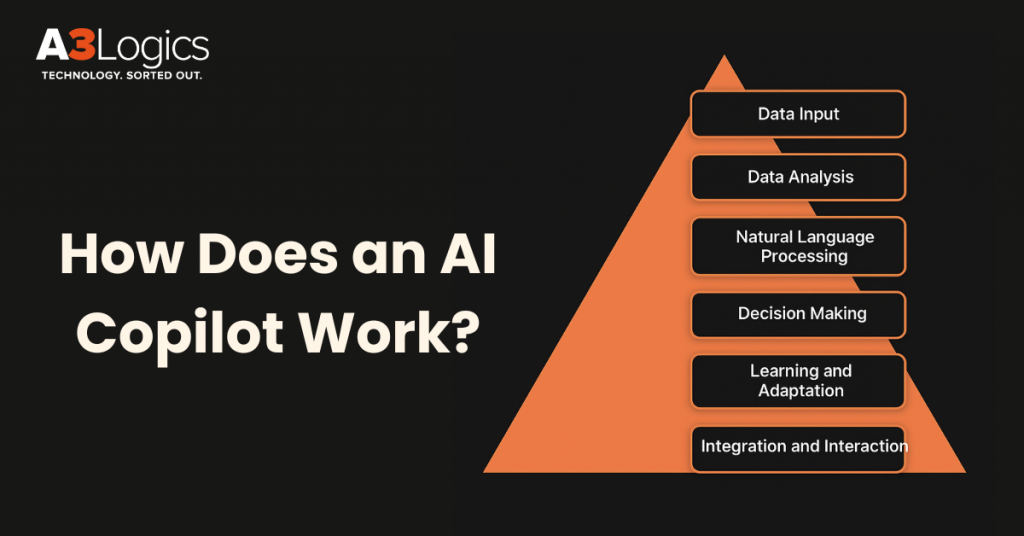
1. Data Input
AI Copilots fetch data from various sources within an organization, such as emails, conversations, documents, and databases. This data acts as a foundation for learning and executing various tasks.
2. Data Analysis
Using machine learning algorithms, AI analyzes the data it has received for trends, patterns, and insights. For example; AI analyzes historical sales data, market trends, and customer interactions to forecast future revenue. Using this data, the sales manager can get predictive insights on which deals are most likely to close.
3. Natural Language Processing (NLP)
Copilot comes with applications that use NLP or Natural Language Processing. It understands and responds to user commands in natural, everyday language that sound human. This enables the tools to perform tasks such as writing stories, generating code, and creating complex workflows.
4. Decision-Making
Based on predefined goals and analysis; the AI copilot can make decisions. It can extract information from vast amounts of datasets. Based on this information, it observes patterns, and produces context-specific information, thereby helping in making informed decisions.
5. Learning & Adaptation
One of the benefits of AI Copilots is that they can learn continuously and adapt to situations from time to time. These use advanced machine learning algorithms to analyze user interactions and organizational data to tailor responses. Based on their learning; they customize recommendations and also take into consideration user needs and preferences to provide future responses.
Enterprise Use Cases of AI Copilots
Let’s have a look at some of the common AI Copilot use cases –
1. Customer Service Automation
When handling customer service, AI copilots can help answer frequently asked questions. This takes the burden off human workers, allowing them to focus on answering more complex queries. Human workers and AI copilot together can enhance customer service; and make them happier.
2. Code Completion & Developer Productivity
Developers can benefit a lot from AI-Copilot. There are tools like GitHub Copilot that help writers by predicting code snippets based on the current situation. This removes instances of errors and increases productivity. This makes developers more productive and also makes the process of software development better.
3. AI Writing Assistants
Not only for developers, AI-Copilot can help writers write polished and correct pieces. While writing, AI copilot for enterprises can provide clarity suggestions, help improve the writing style and proofread the content. This way, time spent on revisions can be reduced and the overall quality of the article can be improved.
4. Personal Finance & Business Assistants
AI copilots for personal finance can help enterprises with expense tracing, budgeting, and investment advice. By assisting users to analyse financial data, these AI-based Copilot tools can help users make informed decisions and achieve financial goals.
5. Automating Repetitive Tasks
One of the benefits of AI Copilot for enterprises is that they can automate mundane and repetitive tasks. This also includes high-volume tasks where things like transferring files, filling forms, updating records, or collecting data are involved. Again, by automating these repetitive tasks, employees can focus more on strategic work, thereby reducing errors and increasing productivity.
6. Knowledge Management
Another prominent AI Copilot use case is how it helps organizations manage their knowledge base by organizing files, papers, and frequently asked questions, making them easy to find. They help employees find the right information when needed. This reduces time and improves learning across the whole company.
7. Communication Workflows
AI Copilot is integrated as an intelligent AI assistant for business. It makes use of Large Language Models and Generative AI to automate repetitive tasks – summarizing meetings, drafting emails, and creating content. The tools help refine messages.
8. Data Insights & Analytics
As an AI assistant, AI Copilot helps users visualize data. Here’s how – Users can ask questions related to their data using normal language, and Copilot can generate relevant reports. It can quickly identify key themes, and patterns in large datasets. It can even help track and remove anomalies.
9. Process Orchestration Across Systems
AI Copilot Integration with multiple platforms helps automate cross-application workflows. This helps in the reduction of manual processes across various business processes.
10. Enterprise-Wide Copilot Support
AI in enterprises refers to the integration and deployment of AI assistant technologies across an entire organization to enhance decision-making, productivity, and operational efficiency. The AI Copilot support model enables employees at all levels and functions, including finance, sales, HR, IT, and others. All employees can use AI Copilot’s capabilities, such as automating tasks, summarizing information, generating content, and analyzing data.

Key Considerations Before Choosing an AI Copilot
Before building and implementing AI Copilot for enterprises, you should keep in mind a few considerations –
1. Security & Privacy
Considering that AI Copilot uses a lot of data, it is important to first ascertain how it uses and manages your sensitive data. As a measure to prioritize data security, opt for Copilots that offer military grade robust encryption, compliance with regulatory standards such as HIPAA and GDPR, and secure APIs.
2. Understanding Enterprise-Specific Needs
Since the intent of deploying an AI Copilot is to fulfill organizational goals, it should be developed or integrated in such a way that it understands the processes of the organization to begin with. It should be fed enterprise-specific data so that Copilot can understand individual and team needs. It should also integrate seamlessly with daily systems and existing tools.
3. Integration & Scalability
In simple terms, the enterprise AI Copilot that you have integrated into your workflow should be able to handle a growing number of users and an increasing amount of data and requests. All this without a significant drop in reliability and performance. This can be ensured if the Copilot is programmed in a way that it can adjust its infrastructure and resources to meet the changing needs of the business.
4. User Adoption & Training
Merely AI Copilot integration is not sufficient; employees across the organization should be trained on how to use AI Copilot in their daily work. Regular sessions should be held where employees can discuss issues with the Copilot; regular training modules should be provided using which employees can gain a better understanding of the functionality of the AI Copilot.
5. Long-Term Strategic Roadmap
Before choosing an AI Copilot, it is important to have a clear plan. It is important to check if the AI Copilot aligns with your business objectives. Simultaneously, you should also have a look at the technology and the data strategy for a reliable and scalable AI Copilot solution. Next, when you build an AI copilot, build repeatable processes that deliver tangible business value.

Advantages of AI Copilots for Enterprises
1. Increased Productivity
Copilot induces AI in enterprises with which it helps in faster task completion. It handles mundane tasks such as replying to simple customer queries and data entry, thereby freeing employees to focus on more strategic tasks.
2. Unified Operations
One of the benefits of AI Copilot integration with various business systems is that it makes employee communication simple using natural language commands. Furthermore, AI Copilots are powered by advanced machine learning algorithms, using which they can quickly access essential data, making tasks easier and smoother.
3. Cost Efficiency
AI Copilot for enterprises helps cut costs related to manual and repetitive tasks. It helps free up valuable resources and reduces the need for large support teams required to resolve simple support issues.
4. Support for various channels and languages
AI Copilot provides support across multiple platforms such as Microsoft Teams, Slack, web portals, and emails. This ensures that employees can access help anytime, anywhere, for a smoother work experience.
5. Improved Information Quality
AI Copilot improves information quality by ensuring accuracy, and clarity through access to enterprise specific data. It analyzes vast datasets to identify patterns and produce context-specific information; eventually enabling more informed decision-making.
6. Enhanced Customer & Employee Experience
Unlike human-based customer support; AI Copilots are available 24/7. They provide omnichannel support where they communicate consistently across channels like chatbots, websites and social media. Apart from that, AI-based Copilots can support global clients, thanks to their ability to answer in multiple languages.
How to Build an AI Copilot for Your Enterprise?
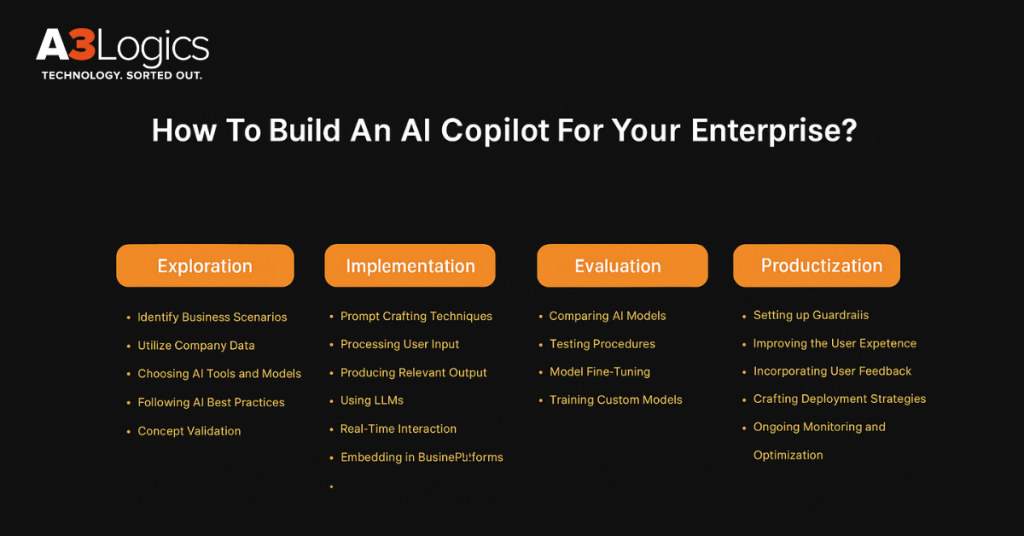
To build AI copilot, follow the steps mentioned below –
Stage 1: Exploration
a) Identify Business Scenarios
It starts with identifying which of your business areas AI Copilot can benefit the most. Begin by looking at the various departments of your organization and identifying the specific processes where AI Copilot can automate tasks and boost efficiency. Especially, locate the areas where the various AI Copilot tools can reduce errors.
b) Leverage Company Data
When training AI Copilot, the data holds a very important place. This means that the data you choose for the AI Copilot training should be of high quality and relevant. Here, it isn’t just about collecting data; it is also about filling any content gaps to ensure that you get maximum accuracy.
c) Select AI Tools & Models
There are various AI tools and models on which you can base your AI Copilot. Some of the popular tools include Microsoft Copilot Studio, Azure AI Studio, and GitHub Copilot. You can use platforms like these for building and deploying AI solutions.
d) Validate Concepts
Before implementing AI Copilot on a full scale within your organization, begin with small steps. You could begin with small proof of concepts where you test the AI Copilot in smaller scenarios. At every step, receive feedback and work on issues that may be hindering its performance. Smaller steps in smaller scenarios will make sure that the AI Copilot is able to meet business goals.
Stage 2: Implementation
a) Prompt Engineering Techniques
Since the prime component of Copilot is AI, prompts would play a very crucial role. Not every prompt will return the desired output. As such, train your employees on using the correct prompts that are contextual and that will give them the desired results.
b) User Input Processing
For an AI Copilot to function effectively, it is essential to build a system that can analyze and interpret user input effectively. This involves using technology like natural language processing (NLP) to identify the sentiment and intent behind a user’s query. A robust system should be able to handle various formats and deliver accurate responses.
c) Relevant Output Generation
Your AI assistant for business must deliver responses that are both accurate and engaging. For this, use advanced text generation models that can adapt to user preferences and the flow of conversation.
d) LLM Utilization
Large Language Models enable the AI Copilot to process user requests and understand context. With the help of these, a user can generate creative content and perform complex tasks by training on a vast amount of data. AI Copilot leverages LLM to become a capable assistant. It summarizes documents and answers complex questions.
e) Real-Time Interaction
When implementing AI Copilot for enterprises; it should be able to respond to queries in real-time. It should be able to provide immediate assistance with tasks such as drafting emails, summarizing documents, generating content, and automating repetitive actions. The real-time interaction is possible because the AI processes user prompts and accesses relevant data from the application.
f) Conversation Orchestration
In this step, you structure the conversational flow of your AI Copilot. You implement dialogue management systems that are designed to handle multiple conversation threads. These systems can retain context and adjust dynamically to user input.
g) Integration with Business Platforms
During the implementation stage, AI Copilot integration with existing workflows and systems is very critical. So, when implementing AI Copilot for enterprises, develop custom interfaces, APIs, and plugins to enable the AI to interact smoothly with enterprise software. This step also helps in minimizing disruptions in current operations.
Stage 3: Evaluation
a) Compare AI Models
When implementing AI Copilot for enterprises, choose the right model for your business. For this, set clear criteria by looking into aspects such as how well the model integrates with existing systems, performance benchmarks, and whether the system is scalable as your business grows.
b) Conduct Testing Procedures
Testing models is an important part of the evaluation stage. Here, you run prompts and evaluate the Copilot; ascertaining how it functions across the entire system. You also check the results obtained from Copilot against the set metrics. This step helps you find out if the Copilot is functioning smoothly as expected or not.
c) Fine-Tune Models
Once the testing is done; gather feedback from users and see if there are any changes required. Accordingly, you can retrain the AI with more data. The feedback from users can also help determine if the AI Copilot is as per your business goals.
d) Train Custom Models
You can also create custom models if the pre-built models fall short of your expectations. This can create models and train them on unique datasets. It can customize the models as per your conversation style and changing business demands.
Stage 4: Productization
a) Guardrail Implementation
AI Copilot guardrails are designed to make sure that AI assistants operate within established ethical, quality, security, and compliance standards. These are essentially safety checks that involve implementing restrictions and rules on both input and output from the AI Copilot.
b) Better User-Experience
Create a user interface; easy to learn and use, with clear feedback mechanisms and instructions. Develop the Copilot to understand the user’s current task and context. Also, consider providing options for user preferences and customization.
c) Feedback Incorporation
Receiving constant feedback from end users is crucial. So, collect user feedback to identify areas of improvement, on its accuracy, usability, and usefulness. Utilize the feedback to retrain the AI model. Gradually improving its responsiveness and performance.
d) Deployment Strategy
In a phased rollout, you can introduce Copilot to different user groups or departments. At this stage, plan how you will launch AI Copilot across platforms such as mobile apps, websites, and social media. Your deployment strategy should include testing with a selected group of users. This will help you solve any issues beforehand since you will able to gauge performance of Copilot with a small group of people.
e) Ongoing Monitoring & Optimization
Define and track key performance metrics to find out the Copilot’s impact on efficiency, productivity, and user satisfaction. Regularly review the Copilot’s performance; identifying areas for further improvement and optimization.
Four-Phase Enterprise AI Copilot Implementation Strategy
For controlling AI Copilots across business functions, a four-phase AI Copilot implementation strategy can be adopted –
Phase 1: Basic LLM Integration
This phase demonstrates the potential of LLMs to simplify day-to-day operations with a low-risk and straightforward approach. Through this step, businesses can see the benefits of AI with minimal disruption in their current operations. Copilots can be easily implemented by businesses in their digital strategy.
i. Use Cases
- Content creation: generate posts for social media platforms.
- Email handling: respond to emails in a contextual manner
- Automating frequently asked questions: optimize the process of answering customer queries.
- Summarization: summarise and highlight key information in articles and reports
- Grammar checks: remove grammatical errors in content
- Sentiment analysis: analyze sentiments and emotions in customer reviews and support calls to gauge public opinion.
ii. Implementation
To implement basic Copilot, minimal resources are required; It involves subscribing to a reliable API provider such as OpenAI or Hugging Face and integrating their API into your platform.
iii. Strengths
- Quick setup with operational benefits
- Enhances a wide range of applications with basic AI functions.
- Minimal investment to get started.
- Allows for simple tweaks so that Copilot can suit specific operational needs.
iv. Limitations
- Suited for general use cases
- As usage expands, operational costs may increase
- There may be errors in tasks that require deep domain expertise
- Data privacy and compliance risks when handling sensitive information.
Phase 2: Customized LLM Implementation
In this phase – AI Copilots are customized and fine-tuned with domain-specific data so that they can meet organizational needs. The phase prepares AI Copilots for specialised operational requirements –
i. Use Cases
- IT support: automated handling and translation of IT support tickets
- Finance: draft and manage operations and queries in the finance domain
- Legal: summarize complex documents
- Marketing: generate customized content for campaigns
- Healthcare: provide early diagnoses based on historical patient data, and symptoms
- Customer insights: analyze patterns in customer feedback to provide better services and resolution to queries.
ii. Implementation
A significant investment is required in skilled teams for fine-tuning the models and computational resources, such as GPU.
iii. Strengths
- Better accuracy in specialised tasks and more context-aware responses.
- An AI system is better at handling potential breaches.
- Initial setup of this phase is resource-intensive, whereas in the long run, the company can see a significant reduction in the cost.
iv. Limitations
- Designed to excel at single-step tasks.
- Continuous updates are needed to maintain accuracy.
- Substantial upfront cost and resource allocation are needed for continuous adaptation and setup.
Phase 3: Advanced Operational Integration
Phase 3 Copilots help organizations tackle complex challenges; The phase focuses on integrating multiple AI systems to form advanced pipelines to manage intricate, multi-step processes across different business systems.
i. Use Cases
- Medical research: deep analysis of medical studies and texts to support healthcare decision-making
- Team productivity: automating routing follow-up tasks to boost productivity
- Global support: comprehensive support for global HR and IT operations.
- Financial insights: developing and assessing financial models to predict market trends and future economic conditions.
- Supply chain optimization: enhancing supply chain and logistics operations.
ii. Implementation
At this stage; several LLMs are combined into one cohesive system. Techniques such as data linking and entity extraction enhance the AI’s ability to interpret complex inputs.
iii. Strengths
- Seamless integration with existing systems; leading to improvement in workflow..
- Advanced AI Copilots provide contextual insights, facilitating complex decision-making.
iv. Limitations
- Advanced AI Copilots are less scalable because of high computational cost. These may pose difficulties when implemented on a large scale.
- The Copilots are comparatively more complex than those in the previous phases.
Phase 4: Strategic Enterprise Adoption
During this phase, the AI Copilot becomes an integral part of the organization’s major functions and helps in making strategic decisions. It also helps in handling critical operations while ensuring high accuracy –
i. Use Cases
- Enterprise-wide support: supports decision-making at a large scale
- Compliance monitoring: ensure adherence to protocols
- Content management: curate and generate content across organizations to maintain relevance and consistency
- Customer engagement: improve customer service and engagement through responsive and personalised interactions.
ii. Implementation
This phase requires significant resources including advanced technologies and specialised teams. These advanced Copilots employ sophisticated reasoning and deep integrations with existing systems. These AI Copilots need to be agile and capable of changing depending on the situation. They should also be able to handle new challenges and expand use cases.
iii. Strengths
- Strong security measures
- Comprehensive coverage of business functions
iv. Limitations
- Large initial investment
- The need to adapt to technological and business needs
- Sophisticated management of integrated systems
Challenges in Building AI Copilots
When you build AI Copilot for enterprises, you may also have to embrace some challenges. Here we have enlisted some of the common challenges –
1. Effective Interaction with LLMs
Developing intricately designed prompts that can draw out desired responses is both time-consuming and sensitive. You may also need to restructure the output to meet your business standards. Also, keeping in mind the unpredictable nature of AI, you may need to have a deep understanding of the underlying technology.
2. Testing & Validation Complexity
Considering that AI Copilots are still in their nascent stage, there is a lack of standard tests to check how well LLMs perform. You may face challenges when trying to monitor the performance of AI Copilots. For instance, you may have to go through stringent testing measures, and may also have to deal with regulatory compliance, especially in industries where data security is crucial.
3. Continuous Learning & Developer Experience
Like we mentioned, there are no concrete guidelines for understanding LLMs. As such, organizations may often find themselves learning on the go, posing a steep learning curve for new developers. Talking of which, they may face difficulties starting new projects, integrating tools in existing workflows, and may even desire for more integrated environments.
4. Data Governance & Ethical Concerns
Building an AI Copilot requires strict data privacy, security, and regulatory compliance. There is a constant need to address bias in training data and ensure that the tools are transparent; Ethical concerns include – protecting intellectual property and preventing misuse of data.
How A3Logics Can Help Build an AI Copilot?
Building AI Copilots can come with various technical challenges. Here’s how A3Logics can help you build an AI Copilot –
1. Tailored AI development expertise
As a leading AI development company; we offer cutting-edge AI development services customized to simplify operational efficiency. Our services are also inclusive of AI consulting, where we help you integrate AI applications into your workflows. You can use our services to plan and execute your AI Copilot projects. With our services, you can create a solid foundation to back up your AI Copilot apps.
2. Secure, scalable, and enterprise-ready solutions
We develop AI Copilot solutions that are built keeping in security in mind. These are designed to handle increasing workloads and are customized to meet enterprise requirements.
3. Proven track record in AI implementation across industries
We have a proven track record of delivering successful AI projects across diverse sectors; You can solve unique industry challenges through our AI Copilot Development services.

Conclusion
In today’s fast-paced world , a tool like AI Copilot in an enterprise setting isn’t just a luxury; it’s essential for enterprises wishing to stay competitive, efficient, and innovative. Building an AI Copilot would need more than technology; it needs a strategic partner who understands every phase. Here, we have covered key steps, benefits, and challenges, highlighting why collaboration with expert AI developers is crucial to unlocking the full potential of an AI Copilot for your business.