
The AI Scheduling Assistant App has changed the face of productivity, laying the foundation for intelligent and automated scheduling experiences for professionals and organizations all over the world. Whether you’re a solo entrepreneur or part of an enterprise-scale team, the need for powerful AI Scheduling Apps will always be there.
It is spurred on by the promise of reduced missed meetings, seamless collaboration, and significantly increased time management. If you are thinking about investing in an AI scheduling assistance app, then we are here to help you understand all about it in detail.
Here in this post we are going to outline why developing an AI Scheduling Assistant App will be the next necessary step for your business and which desired features to consider for proceeding ahead with. We have covered all the necessary aspects related to the development of this app so that you can proceed ahead with complete clarity. Read on.
Why Legacy Scheduling Tools Need A Change?
Legacy scheduling tools are known for bringing headaches in the process through endless email threads, double bookings, fragmented calendars, and wasted time. The AI Scheduling Assistant is an advanced scheduling tool that incorporates artificial intelligence, machine learning, and intuitive UX to simplify the experience of booking an appointment.
Developing an effective AI Scheduling Assistant App is not limited to the largest tech organizations; any organization or startup of any type can engage in effective and intelligent appointment and resource management with strategic planning and development.
What is an AI Scheduling Assistant?
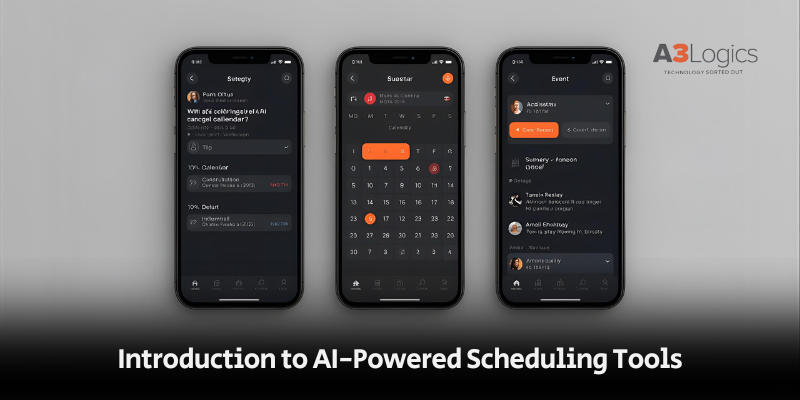
An AI Scheduling Assistant is a smart software, usually mobile or web-based, that automatically helps users to schedule meetings, appointments, or events.
By using NLP, real-time calendar integration, user preferences, and workflow logic, the AI Scheduling Assistant App understands when you are available, resolves conflicts, and even communicates with guests to find the best times to proceed ahead in terms of meeting.
As per the experts, there are leading AI Scheduling Apps that are able to handle complex scenarios like time zone conversion, recurring bookings, group events, or last-minute changes much more efficiently than a manual process.
But, the question remains as to why one should invest in building an AI scheduling assistant application, we have answered it for you below. Read on.
Why Should You Build an AI Scheduling Assistant App?
The global AI Scheduling Software market is growing rapidly. Infact, as per the latest reports, 83% of organizations that currently leverage AI Scheduling Software reported a positive ROI within three months. Not only this, more than 64% of businesses saw a significant gain in productivity.
AI Scheduling Assistant Software is also expected to save enterprises $4.5 billion in labor cost by 2027 from appointment automation. Remote work, hyper-connected teams, and digital customers have made an AI Scheduling Assistant App more than a differentiator in all the industries. Today, they have eventually become quite an essential part of all businesses in terms of conducting efficient operations.
Benefits of Developing an AI Scheduling App
1. Benefits for End-Users (The Customers)
Customized AI Scheduling Assistant apps are appreciated for their exceptional end-user experience as specified below, check it out:
- Significantly Less Time and Increased Productivity: Users spend 5 to 15% less time preparing for meetings; they can relinquish complex logistics responsibilities to the AI in just a few seconds.
- Reduced Mental Load and Cognitive Overhead: These tools take the scheduling dilemma off the user’s plate in favor of concentrating on more important tasks than managing calendar logistics.
- Reduced Errors and Scheduling Conflicts: Intelligent user availability checks and real-time notifications mitigate double bookings and last-minute cancellations.
- Embodied Professionalism and User Experience: From branded booking links to envelope style Email reminders, the user feels that every meeting is being managed.
- Increased Quality of Work and Focus: Intelligent boundaries keep meetings out of the users preferred hours. Not only this, the respective tools help the user practice healthier routines to decrease burnout.
2. Benefits for Enterprises and Teams (The Organizations)
AI Scheduling apps provide organizations with a significant competitive advantage in the following ways:
- Optimized Use of Resources With Lower Expenses: AI Scheduling Apps help to ensure that conference rooms, staff, and resources are used to full capability, reducing wasted time and costs.
- Reducing Friction in Internal and External Collaboration: Automated schedulers take the pain out of coordinating for multiple participants, time zones, and preferences, so teams and clients can coordinate without added friction.
- Informed Analytics on Time Use: Data for activity lets team owners recognize productivity leaks, develop an optimal workload, and anticipate hiring needs.
- Empowering to Integrate into the Company’s Tech Stack: Connects into a site such as Slack, Zoom, CRM, HRMS. Building a centralized workflow ecosystem for operations, sales, and support.
Key Features of an AI Scheduling Assistant
a. Core Features (MVP)
Calendar Integration (Read & Write): Two-way connection with Google Calendar, Outlook, or iCal so the user has full control of appointments.
Availability Rules & Time Preferences: Availability adjustable by work hours or predefined “do not schedule” time frames, and buffer times.
Natural Language Processing (NLP): Allows the user to enter commands such as “Book a call with John next Tuesday after lunch.”
Smart Time Suggestions: Instantly finds the best times, alternatives, and reschedules times.
Booking Flow & One-click Confirm: This particular feature is highly acclaimed for completely minimizing the multi-step booking process. In fact, it helps in making things simple as booking gets done in a matter of a click.
Notifications & Reminders: With the help of the respective feature, businesses get benefited with alerts through email, SMS, and in-app or push notifications. This plays a key role in reducing no-shows and last-minute cancellations.
Basic Integrations: Core APIs like Zoom, Slack, payment systems, and tools like Notta create an interconnected system.
Safety & Privacy: Assists in processes like GDPR-ready handling, encryption in transit and at rest.
b. Advanced AI-Powered Features
Two-way Negotiation: The AI Assistant for Appointment Scheduling can communicate entirely independently with users to book appointments.
Proactive Scheduling: Recommends follow-ups, check-ins, or automation based on user behavior.
AI-driven Prioritization: Amplifies high-priority requests, communicates urgency, and allows client segmentation.
Multilingual NLP: Books appointments in any language that users prefer for global applicability.
Group Scheduling Optimization: For organizations with larger teams, can source slots, even with multiple calendars and time zones.
Smart Calendar Hygiene: Automatically address hold events, recurring cleans, and duplicate entries.
Admin Dashboard & Analytics: Reports on productivity, usage of resources, and adoption.
White-label / Embedding: AI Appointment Scheduling software can be white-labeled or embedded as part of a platform.
Custom Workflow Automations: Steps will be triggered after booking to facilitate actions, like feedback surveys or invoices.
Step-by-Step Guide to Building Your AI Scheduling Assistant App
In order to create a better AI Scheduling Assistant, knowledge of the technical side of development, domain knowledge, and focus on the end-user is essential. For those interested, below is a see realistic step-by-step guide that the team at A3Logics would follow:
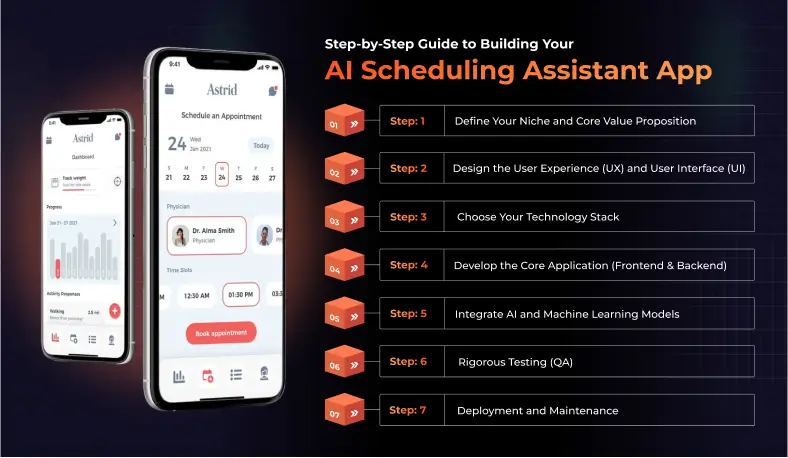
Step 1: Determine your target niche and what to offer
Define use cases for your AI Scheduling Assistant App by identifying the industry or use type. Also that you define the unique selling proposition (USP) to what degree Trust or credibility will be a deciding factor for the application, e.g. is there a HIPAA compliance requirement for medical use cases. In fact, it can also be defined by figuring out if you are optimizing meetings across the firm for corporate applications.
Step 2: Outline the User Experience (UX) and User Interface (UI)
Design for seamless booking, comfortable conversational experience, mobile application, and visuals will certainly assist in the success of AI Scheduling assistant application. It is tied to intuitiveness and ease of use for maximum gain.
Step 3: Decide on your Technology Inputs
Determine a cross-platform framework including React Native and Flutter and backend code including Node.js and Python. We will also work on assessing the database that includes MongoDB and PostgreSQL, and natural language processing plugins like OpenAI and Dialogflow. Our experts will also work on calendar integration APIs (Google Calendar, Office365). Being the most reliable mobile app development company, we ensure that everything is sorted to perfection in terms of tech-build for the application.
Step 4: Build your core application (Frontend & Backend)
Continue development of skeleton features (calendar sync, user accounts) and build out a backend service that easily scales to millions of bookings. Use agile sprints to release your first features incrementally each sprint while improving collaboration and providing value on each iteration.
Step 5: Integrate AI and Machine Learning Models
Utilize Natural language processing for smart commands, Reinforcement Learning for better suggestions, and AI Assistant for Appointment Scheduling to automatically schedule appointments. This is one of the most important steps to build an AI App as it helps you make the most out of the latest tech-facilities that can enhance overall productivity.
Step 6: Rigorous Test (QA)
Traverse automation and manual QA processes to identify edge cases: calendar edge cases, API failure edge cases, language parsing edge cases. Also, you should make security, privacy, and performance updates at least every four months.
Step 7: Implementation and Maintenance
After you develop the AI Scheduling Assistant App, you can deploy it to the app store/web platforms, and then manage with requisite monitoring, feedback loops, and continuous updates.
Architecture & Components
A robust AI scheduling assistant combines realtime processing, natural language understanding, and secure integrations.
a. Core Components
- Client apps: Web frontend (React/Vue), mobile apps (React Native/Flutter or native), embeddable widget
- API gateway: Auth, rate-limiting, API routing
- Backend services:
- Scheduling engine: availability calc, rule engine, conflict resolver
- NLP/Parser: intent + slot extraction for natural language inputs
- AI/ML services: preference learning, priority scoring, proactive suggestions
- Integration adapters: Google, Microsoft, CalDAV, Zoom, Slack, CRMs
- Scheduling engine: availability calc, rule engine, conflict resolver
- Database: relational DB for transactional data (Postgres), NoSQL for session/fast lookups (Redis)
- Message bus: pub/sub (RabbitMQ, Kafka) for decoupling tasks (notifications, invites)
- Worker layer: background jobs for reminders, syncs, ML training
- Auth & Security: OAuth2.0 flows for calendar APIs; token encryption; access logging
- Monitoring & analytics: observability (Prometheus/Grafana), user analytics (Mixpanel/Amplitude)
b. Data Flow (Simplified)
User requests → API gateway → NLP parse → Scheduling engine evaluates availability using calendar sync → Proposes times → User/participants confirm → Backend writes event to calendars + schedules reminders.
Tech Stack Recommendations
1. Frontend
- Web: React + TypeScript, Next.js for SSR if SEO matters
- Mobile: React Native or Flutter for cross-platform; native (Swift/Kotlin) for premium experience
- UI library: Tailwind or a design system (MUI, Chakra) for faster builds
2. Backend & APIs
- Language: Node.js (TypeScript) or Python (FastAPI) or Go for performance
- Web framework: Express / NestJS (Node), FastAPI (Python)
- DB: PostgreSQL for transactions; Redis for free/busy cache & rate limiting
- Message broker: RabbitMQ or Kafka
- Background jobs: BullMQ (Node) / Celery (Python)
3. AI / NLP
- Intent & parsing: spaCy, Rasa, or transformer-based models (Hugging Face)
- Pretrained LLMs: use commercial / hosted LLMs for text parsing and natural responses, or self-host Hugging Face models if privacy/latency is critical
- ML infra: scikit-learn for lighter tasks, PyTorch/TensorFlow for custom models
- Vector DB (optional): Pinecone, Milvus, or open-source for embeddings (for context-aware suggestions)
4. Integrations & SDKs
- Google Calendar API, Microsoft Graph API (Outlook), CalDAV for Apple
- Video: Zoom / Google Meet / Microsoft Teams APIs
- Messaging: Twilio for SMS, SendGrid for email
5. Infrastructure & DevOps
- Containerization: Docker + Kubernetes (for scale)
- Hosting: AWS / GCP / Azure (serverless options like AWS Lambda for occasional tasks)
- CI/CD: GitHub Actions, GitLab CI
- Secrets & config: Vault / AWS Secrets Manager
6. Monitoring & Security
- Logging: ELK stack or hosted alternatives
- APM: Datadog / New Relic
- Encryption: TLS for transport, AES-256 for stored tokens
How Much Does It Cost to Build an AI Scheduling Assistant App?
The cost for an AI Scheduling Assistant Application will range from $25,000 (for a simple MVP) to $200,000+ for an enterprise level solution depending on a number of factors including:
- Core vs. advanced feature set (NLP, integrations, analytics)
- Deployment (multi-platform vs. web only)
- Data secure and hosting requirements
- Complexity of the AI model, preparation of training data, and ongoing tuning
- UI/UX design needs
- Integration with external APIs/platforms
On average, companies that plan to budget for a complete AI Appointment Scheduling Software (iOS, Android, web app, advanced AI, rich integrations) should plan on a minimum of $75,000–$150,000 as an investment. Further, there will be recurring costs associated with maintenance, updates, and tuning the AI.
Top Industries That Benefit from AI Scheduling Software

1. Healthcare
AI Scheduling Assistant Apps make scheduling patient appointments more efficient, increase booking rates, and reduce no-shows (essential for telehealth and any clinic).
2. Education
Schools, tutoring businesses, and universities leverage AI Scheduling Software for class scheduling, parent and teacher meetings, and resource allocation, allowing manual workflows to be automated that are complex.
3. Real Estate
Agents simply take advantage of AI Scheduling Assistant Apps to coordinate property showings, schedule Open Houses and coordinate internal meetings in each office; this can save, on average, hours of time each week.
4. Consulting Legal Counsel
Consultants and attorneys are using AI Appointment Booking Software to help cut down client intake and discovery calls, or multi-party coordinating meetings, while maximizing capturing billable hours.
5. Corporate Teams
Corporations are using AI Scheduling Software to help manage the hybrid work environment for employees, internal review meetings, or appointments that require sync pulling from multiple departments, creating the admin tasks that make requests easier and response times more immediate.
Future Trends in AI Scheduling Assistants Beyond 2025
1. Voice-first Scheduling
Voice user input will be the preferred method for adding, editing, or canceling appointments in AI Scheduling Apps.
2. Predictive Scheduling
AI Scheduling Assistants will use the user’s behavior and preferences along with business context to suggest and schedule high-quality meetings proactively.
3. Cross-industry Integration
AI Scheduling Software will interface with the sales, HR, finance, and CRM ecosystems and be part of a holistic business process ecosystem to be future-ready.
4. AI-Powered Meeting Analysis
The next generation AI Assistant for Scheduling Appointments will not only book meetings, but it will analyze interactions, provide information for actionable insights, and improve outcomes.
5. Multi-Modal and Conversational AI
The AI Scheduling App will provide multi-modal scheduling assistance with voice, text, and image using chatbot agents, smart devices, and embedded tools – looking and acting more human-like.
Why is A3Logics Your Ideal Partner for AI Scheduling Assistant App Development?
A3Logics is highly rated as a reliable AI Development Company known for possessing deep specialization in developing your AI Scheduling Assistant. Most importantly, we are also known for our expertise in software development services that serves your development needs to perfection.
We understand your business vision and objective to help you with the right product that gives you an edge. A3Logics combines high talent in AI/ML, agile delivery, and bespoke consulting so you can be assured that your AI Scheduling Assistant App will be durable, compliant, and scalable from MVP to a full-featured ecosystem.
Final Thoughts
So, this shows how creating an AI Scheduling Assistant goes beyond mere convenience. It’s a smart investment in productivity, customer experience, and competitive advantage in the market. Whether it’s time savings for busy professionals or the opportunity to improve workflows for the enterprise, implementing an AI Scheduling Assistant App opens another layer of efficiency with adaptive automation, analytics, and seamless integrations.
And the success of your AI Scheduling Assistant App goes beyond incorporating quality AI tech and relies on strong user-experience design and smart customization. Most importantly, you can accomplish this if you partner with the right team for your AI Scheduling Assistant App and this is where A3Logics comes into picture for all types of custom software development services. We are here to help you get the respective application exactly as per your business vision. Consult now!