
The economic viability of small health-care clinics essentially depends on just one thing – the billing efficiency involved. In the U.S., where nearly 80% of medical bills contain errors and insurance claim denial rates are steadily increasing, erroneous billing processes can hugely affect the overall revenue cycle of a clinic. As for small healthcare facilities that typically operate with limited staff numbers and have restricted administrative capacity, the adverse effects are more pronounced. That’s where a medical billing software for small business changes from being a mere helper to a definitely necessary tool.
With the pre-installed medical billing software, one can now automate the entire process, from patient invoicing to insurance claim submissions, virtually eliminating manual errors, speeding up the collection of funds, and ensuring regulatory compliance. However, creating such a solution requires thorough planning, an adequate understanding of compliance frameworks such as HIPAA and HL7, as well as seamless integration with other systems, including EHRs and payment gateways.
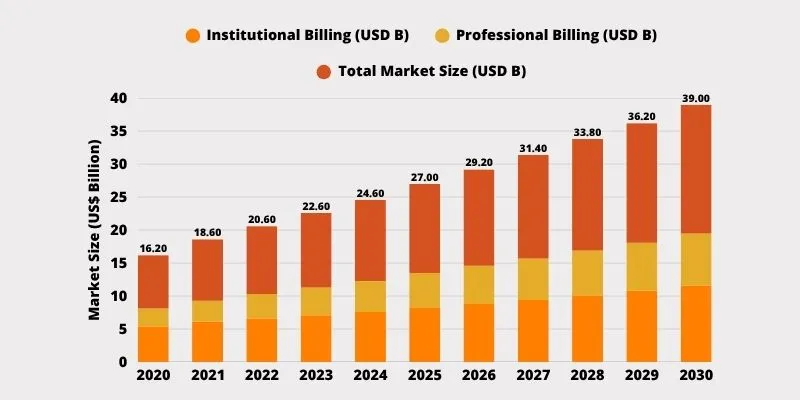
Source: Grand View Research
In this guide, we delve into the definitions of medical billing software, the reasons why small businesses need it, the building steps, and the technologies and trends projecting success in 2025. The goal is to create a practical plan for medical billing software development for small, emerging medical businesses.
What is Medical Billing Software and Why Small Businesses Need It?
Medical billing software is a platform that automates tasks such as coding, insurance verification, claim submission, payment posting, and reporting, leading to faster healthier revenue cycles. These tools are used not only by small clinics, individual practitioners, or startups, but also by medium-sized companies, thereby eliminating numerous spreadsheets and piles of paper with an end-to-end system that significantly improves billing accuracy.
Why is Medical Billing Software Critical for Small Practices?
- Minimizes Human Errors: Research shows that almost 80 percent of medical bills in the U.S. contain mistakes and thus result in payment delays or denials. Medical billing software for small business introduces features as automatic claim scrubbing and real-time checks on coding which can result in a huge reduction of such errors.
- Accelerates Revenue Collection: Based on a survey conducted by Black Book Market Research, 86% of healthcare facilities have improved their collections after availing themselves of billing software.
- Enhances Administrative Efficiency: Manual billing is a productivity killer. However, 90% of providers still use paper-based systems. Switching to digital will save hours every week by automating eligibility verification, charge entry, and payment processing.
- Ensures Regulatory Compliance: Small medical practices must also adhere to HIPAA and HITECH regulations. Medical billing software ensures data privacy, standardized coding (ICD-10, CPT, HCPCS), and secure handling of patient records.
- Improves Patient Experience: Modern-day patients look for transparency and convenience. Cloud-based software for medical billing usually comes with a patient portal where patients can view their bills, ask questions, and pay online, making them feel satisfied and increasing collection rates.
Steps to Build Medical Billing Software for Small Businesses

1. Define Your Goals and Billing Workflow
The very beginning of successful medical billing software development is a deep discovery. Understanding your specific billing workflows, user roles, bottlenecks, and regulatory responsibilities is a must.
Start with your current billing process map. Consider things like:
- How do patients get registered?
- Who does the coding?
- When are claims sent in?
Common pain points for small clinics are unposted payments, manual eligibility checks, and tracking unpaid balances. The lessons learned are essential for shaping the eventual requirements document.
Get all user personnel on board—billing staff, receptionists, administrators, and providers to collect user stories as:
- “As a billing manager, I want to track claim status in real time.”
- “As a receptionist, I want to verify insurance eligibility before appointments.”
This user-centric plan will help you prioritize the core features of your MVP first while also keeping your goals realistic. For example, reducing denial rates by 20% or going completely paperless by eliminating superbills.
Competitive research also matters. Analyze how the best medical billing software for small business, like Kareo, DrChrono, structures its workflows, does integrations, and supports reporting. Extract feature sets that align with your needs and budget.
2. Choose the Right Tech Stack and Platform
One full set of requirements is clear; it is time to implement the technology stack. The technology choices determine security, scalability, speed of development, and future maintenance.
For small businesses, a cloud-based web application is usually the right choice as it has a low upfront cost, auto-updates, and remote access. Mobile responsiveness ensures functionality across tablets and smartphones, especially useful for providers on the go.
Suggested Tech Stack
- Backend: Python (Django), Node.js (Nest.js), or Java (Spring Boot). They are reliable, safe, and backed by a strong community.
- Frontend: React or Angular for responsive, component-based UIs.
- Database: PostgreSQL or MySQL for structured data, optionally MongoDB for logging and analytics.
- Hosting & DevOps: AWS or Azure for HIPAA-compliant cloud hosting, Docker for containerization, CI/CD pipelines for version control.
Moreover, you should also prioritize RESTful API development to support external integrations. For seamless communication with EHRs and payers, you need to be sure your system is HL7/FHIR-ready. These standards are the first step for interoperability with the modern healthcare ecosystem.
Security tools such as TLS encryption, OAuth 2.0 authentication, and role-based access control should be incorporated into the tech stack. Any development firm you work with should demonstrate proficiency in instilling these security layers as best practices.
3. Ensure HIPAA and HL7 Compliance
Every billing software for medical must strictly adhere to the compliance framework. HIPAA, HL7, and operations aren’t optional; they are legal and operational imperatives.
HIPAA Compliance Essentials
- Data Encryption: All PHI must be encrypted at rest and in transit using SSL/TLS and database-level encryption.
- Role-Based Access: Limit access to patient records by job function.
- Audit Logging: Track all user activity, such as viewing, editing, and exporting patient data.
- Automatic Session Timeouts: Prevent unauthorized access from idle sessions.
- Secure Backups & Recovery: Ensure protected backups in redundant environments.
HL7/FHIR Integration
Your billing software should be in the same language as other EHRs, laboratories, and payer systems. HL7 v2 is for messaging and FHIR deals with web APIs. For instance, an HL7 ADT (Admit, Discharge, Transfer) message could update billing records with a patient’s status. FHIR Patient and Claim resources facilitate the standardization of data exchange with EHR platforms and clearinghouses.
By following these standards, your medical billing software for small business becomes interoperable, future-proof, and compliant, thus reducing the risk of audits or denied reimbursements that come from incompatible data formats.
4. Build an Intuitive UI/UX for Staff and Patients
A common mistake in many billing software programs is the poor user experience.
Key UI/UX Principles
- Minimal Learning Curve: Staff members should be able to utilize the core features, such as invoice creation or claim status checking, for the first time within one hour.
- Clean Dashboard: Display actionable insights such as claims pending, total unpaid balances, or today’s billing tasks.
- Patient Portal Integration: Offer mobile-friendly access to view statements and pay bills.
- Accessible Design: Keep consistent icons, color codes (green for paid, red for denied), and tooltips for clarity.
Prototyping and usability testing are essential. Get real users to test mockups early and provide feedback. For instance, staff might request bulk claim submission buttons, patient search filters, or one-click payment posting workflows. These insights are essential to making the final product truly useful.
A well-designed UI/UX should be a top priority; it’s a productivity multiplier that can reduce training time and minimize billing errors.
5. Integrate with EHR, Insurance APIs, and Payment Gateways
No medical billing software for small business operates in isolation. Integration with third-party systems is essential for reducing data entry errors and accelerating workflows.
EHR Integration
Use HL7/FHIR APIs to sync patient demographics, appointments, and clinical codes from your EHR. This ensures charges align with charted services, reducing rejections due to mismatched data.
Insurance & Clearinghouse APIs
- Support X12 837 for electronic claims.
- Use 270/271 transactions to verify eligibility before appointments.
- Receive 835 ERA (Electronic Remittance Advice) for automatic payment posting
Payment Gateways
Enable credit card, ACH, and mobile payments via integration with Stripe, Square, or PayPal. Ensure PCI DSS compliance and tokenization to prevent storing sensitive card details.
These integrations elevate your software from a basic invoicing tool to a best medical billing software for small business standard—fully connected, efficient, and responsive to real-world billing needs.
Essential Features to Include in Medical Billing Software for Small Business
Developing feature-rich and streamlined functionality is crucial for any medical billing software for small business. Below are the core components that must be prioritized to create a solution that matches industry leaders and satisfies the billing needs of small healthcare providers:
1. Patient Information Management
Create a centralized repository where staff can store and retrieve patient demographics, insurance details, and contact data. This module must support:
- Primary and secondary insurance tracking
- Guarantor relationships
- Historical billing records per patient
Having this data in one place ensures consistency across billing, reporting, and claims processing workflows.
2. Insurance Eligibility Verification
Real-time or batch eligibility checks, via integration with payer databases, are indispensable. This helps avoid denials due to inactive policies or uncovered services. Eligibility verification tools should:
- Display coverage details (copay, deductible, coinsurance)
- Log verification attempts with timestamps
- Alert users if a patient is out-of-network or coverage is invalid
3. Charge Capture and Medical Coding
Coding errors are among the top reasons for claim denials. Your software must include robust support for:
- ICD-10, CPT, and HCPCS Level II codes
- Code search and suggestion engines
- Code validation based on payer-specific rules
Advanced systems also include claim scrubbing to detect missing modifiers, mismatched diagnosis-procedure combinations, or demographic mismatches before submission.
4. Claims Submission and Tracking
This is the heart of any software for medical billing. Build a claim engine that:
- Generates 837P (CMS-1500) and 837I (UB-04) electronic claims
- Supports primary and secondary insurance claims
- Allows real-time status tracking via payer or clearinghouse APIs
Include a visual dashboard showing claims in various stages: Draft → Submitted → Accepted → Paid → Denied → Reworked.
5. ERA Posting and Payment Management
Auto-posting of ERA (835 files) is vital. Your platform should:
- Parse and apply insurance payments, adjustments, and write-offs
- Handle patient payments (cash, credit, check)
- Allow manual override for special cases (e.g., underpayment or refunds)
Also, support split payments for multi-service visits and flexible allocation of overpayments.
6. Patient Statements and Online Payments
For practices managing significant out-of-pocket collections, include:
- Printable and digital patient statements with service descriptions and insurance coverage summaries
- Integration with PCI DSS-compliant payment gateways
- Online bill pay through patient portal with e-receipts
Advanced options like automated payment plans and e-reminders can further improve patient satisfaction and recovery rates.
7. Reports and Dashboards
Data visibility is critical for small business growth. Equip your software with:
- A/R Aging Reports
- Claims Denial Analysis
- Provider Productivity Metrics
- Revenue by Payer / Service / CPT Code
Visualization via charts and customizable dashboards helps administrators quickly spot issues.
8. Security and Role-Based Access
Maintain HIPAA compliance with:
- User authentication via multi-factor methods
- Role-based access control (RBAC)
- Detailed audit logs showing user actions on PHI
- Automatic session timeouts and device management
9. Integration Framework
Ensure interoperability with:
- EHRs using HL7/FHIR APIs
- Clearinghouses for claims transmission
- Payment gateways (Stripe, Square)
- Accounting software like QuickBooks
This ensures the medical billing software for small business becomes a seamless component of the broader healthcare IT ecosystem.

Benefits of Custom Medical Billing Software for Small Business
Choosing to build a tailored solution versus buying off-the-shelf can yield transformative outcomes for smaller providers. Here’s how:
1. Streamlined Workflow
Custom platforms reflect your exact operational needs—no irrelevant modules or bloated features. You can optimize the workflow to reduce clicks, avoid redundant steps, and align UI with how your team works daily.
For instance, a billing software for medical lab chains might automatically generate charges from test orders, while a physical therapy practice might prefer customizable templates for recurring sessions.
2. Lower Denial Rates and Faster Payments
By embedding payer-specific rules, local billing codes, and integrated eligibility checks, small businesses can:
- Lower claim denial rates by catching errors early
- Improve first-pass claim acceptance
- Receive faster reimbursement due to fewer reworks
A recent study noted that 86% of claim denials were preventable with automated checks, and AI-powered systems reduced denial rates by up to 20%.
3. Full Data Ownership and Compliance
Custom software means you control data access, encryption standards, and hosting location—critical for HIPAA, PCI, and HITECH adherence. There’s no dependency on a vendor’s infrastructure, and you can enforce your own disaster recovery policies.
4. Scalability and Integration Flexibility
Custom-built systems are easier to expand. As your small practice expands into multiple locations or adds specialties, the system can evolve to accommodate new user roles, billing scenarios, or integrations.
Third-party Healthcare Software Development Company solutions may not accommodate such agility or require expensive customizations.
5. Competitive Differentiation
For billing services targeting other clinics, having a proprietary, branded platform offers a major edge. You can deliver specialized functionality and potentially license the software to partners, turning a cost center into a product asset.
How Much Does It Cost to Build Custom Medical Billing Software?
The cost of medical billing software development varies based on scope, features, and integration complexity. However, data-backed estimates help set realistic expectations.
| Project Type | Description | Estimated Cost |
| Basic MVP | Patient management, charge capture, claims, payments | $10,000 – $30,000 |
| Mid-Level | Includes automation, integrations, reporting dashboard | $30,000 – $70,000 |
| Advanced | AI features, full EHR/clearinghouse integration, scalability | $70,000 – $150,000+ |
Key Cost Components
- Planning & UI/UX Design: ~$5,000–$15,000
- Backend & Frontend Development: Based on 500–1,200 hours at $40–$100/hour
- Testing & QA: 15–20% of total project cost
- Hosting & DevOps (Cloud): $100–$500/month for small scale
- Maintenance: 15–20% annually for bug fixes, compliance updates, and support
Developing in phases (MVP → enhancements) is a cost-effective strategy for small businesses. Partnering with an experienced Software Development Services provider ensures better estimates, quality control, and adherence to compliance from day one.
Best Tech Stack for Small Business Medical Billing Solutions
Choosing the best tech stack is critical for ensuring that your medical billing software for small business is scalable, secure, and maintainable. The stack should align with healthcare compliance needs and support integrations with EHRs, clearinghouses, and payment gateways.
Recommended Tech Stack Components
| Layer | Technologies | Purpose |
| Backend | Node.js (Nest.js), Python (Django), Java (Spring Boot) | Build secure APIs, handle business logic |
| Frontend | React, Angular | Build responsive, user-friendly UI |
| Database | PostgreSQL, MySQL | Store patient data, payments, claims |
| Infrastructure | AWS, Azure, Docker, Kubernetes | Cloud hosting, container orchestration |
| Security | OAuth 2.0, SSL/TLS, JWT, RBAC | HIPAA-compliant authentication & access |
| APIs & Integrations | HL7, FHIR, X12 (837/835), REST APIs | Seamless EHR and payer connectivity |
| Payment | Stripe, Square, PayPal SDKs | Secure patient billing & online payments |
| DevOps & Monitoring | GitHub Actions, Sentry, CloudWatch | CI/CD, logging, and uptime tracking |
This tech stack supports building highly responsive software for medical billing, while maintaining HIPAA compliance and enabling fast iteration cycles. Whether you develop in-house or hire a Healthcare Software Development Company, using these technologies will help future-proof your product and reduce technical debt.
Top 10 Medical Billing Software in 2025
Studying the market leaders helps set performance benchmarks and identify areas for innovation. Here are the top 10 best medical billing software platforms in 2025:
| Software | Ideal For | Highlights |
| Kareo Billing | Small clinics | Real-time tracking, integrated patient portal |
| AdvancedMD | Mid-sized practices | Custom billing rules, EHR integration |
| AthenaCollector | Enterprise & networks | AI-driven denial management, payer intelligence |
| DrChrono | Mobile-first practices | iPad-based billing, e-prescription + billing integration |
| NextGen | Multi-specialty clinics | Advanced RCM, EHR & pharmacy integration |
| Cerner PowerChart | Large health systems | Unified inpatient/outpatient billing |
| eClinicalWorks | Community health centers | End-to-end billing + telehealth support |
| Practice Fusion | Budget-conscious clinics | Free EHR, integrated basic billing |
| Medisoft | Solo/small providers | Affordable desktop-based billing |
| CareCloud | Growing practices | Real-time dashboards, scalable SaaS model |
Each of these platforms embodies different approaches to usability, integration, and automation. If you’re building your own solution, benchmarking your MVP against the best medical billing software for small business like Kareo or DrChrono can help you meet user expectations from day one.
Top Trends in Medical Billing Software for Small Businesses
The billing ecosystem is undergoing rapid evolution. To build a future-ready platform, here are the top 5 trends to integrate into your roadmap:
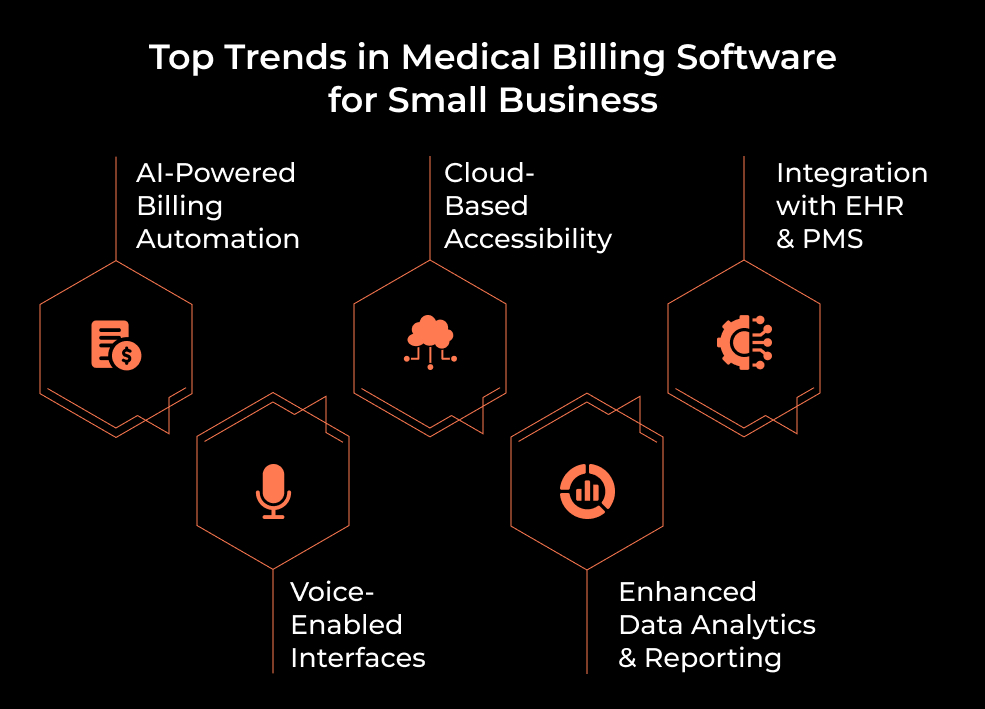
1. AI-Powered Billing Automation
Machine learning models now flag claim errors, recommend billing codes, and automate payment reminders. AI improves first-pass claim acceptance and reduces manual intervention, making it a must-have in modern billing software for medical providers.
2. Cloud-Based Accessibility
Cloud-native solutions enable 24/7 access for staff and patients, minimize IT overhead, and support auto-scaling. Adoption continues to rise among small practices due to flexibility and built-in security.
3. Voice-Enabled Interfaces
AI voice agents like Cedar’s Kora are already managing patient billing inquiries, scheduling callbacks, and initiating payments, offering a contactless, 24/7 support channel that improves patient engagement.
4. Deep Integration with EHRs and Practice Management Systems
Interoperability via HL7/FHIR and APIs allows real-time syncing of encounter notes, codes, and charges, streamlining billing from charting to claims.
5. Predictive Analytics and Smart Dashboards
Modern platforms now offer visual analytics, revenue forecasting, and performance benchmarking. These tools empower small clinics to make data-driven decisions without hiring analysts.
Incorporating these innovations into your medical billing software for small business ensures it remains competitive, user-friendly, and scalable, even as payer rules and patient expectations continue to evolve.
How A3Logics Can Help You Build a Medical Billing Software
Developing a compliant, feature-rich billing platform is complex. A3Logics, a global leader in custom software engineering, offers specialized Billing Software Development Services with healthcare domain expertise.
Why Choose A3Logics?
- Healthcare-Focused Teams: We’ve built EHR systems, practice management apps, insurance platforms, and medical billing software for small business and enterprise clients alike.
- Regulatory Expertise: HIPAA, HITECH, HL7, FHIR, ICD-10, and CPT compliance are embedded into every layer of development.
- Integration Experience: We seamlessly connect billing software with third-party systems—clearinghouses, insurance APIs, pharmacies, and labs.
- Agile Delivery: Using a sprint-based development process with regular demos and transparent progress tracking, we ensure continuous feedback and high client satisfaction.
- Ongoing Support: From maintenance and updates to scalability enhancements, we support your software lifecycle post-launch.
If you’re a clinic, startup, or billing services company looking for end-to-end Software Development Services, A3Logics can help you design and deliver a high-performance solution aligned with your goals, budget, and timeline.

Final Thoughts
Developing medical billing software for small business is both a strategic and operational decision. By investing in a custom solution, small practices gain tighter control over workflows, compliance, revenue tracking, and patient communications. As the healthcare sector embraces AI, interoperability, and cloud-first ecosystems, software built around these principles will yield lasting value.
This guide offered a full blueprint—from setting goals and choosing tech stacks to understanding compliance and integrating with EHRs. Whether you’re building in-house or with a partner like A3Logics, success hinges on user-centric design, regulatory rigor, and feature completeness.
For small clinics, billing companies, and startups, this is more than just software—it’s your growth engine.