Delivery services on demand are now necessary in many fields. People now expect to be able to receive their groceries, food, and even everyday necessities delivered to their doorsteps. Because of this trend, delivery applications have become a big part of the e-commerce world. As people want more options and convenience, food delivery app gives them new methods to get groceries and meals. People used to have to go through menus or telephone in order, but now they expect things to be brought right to their homes without any problems.
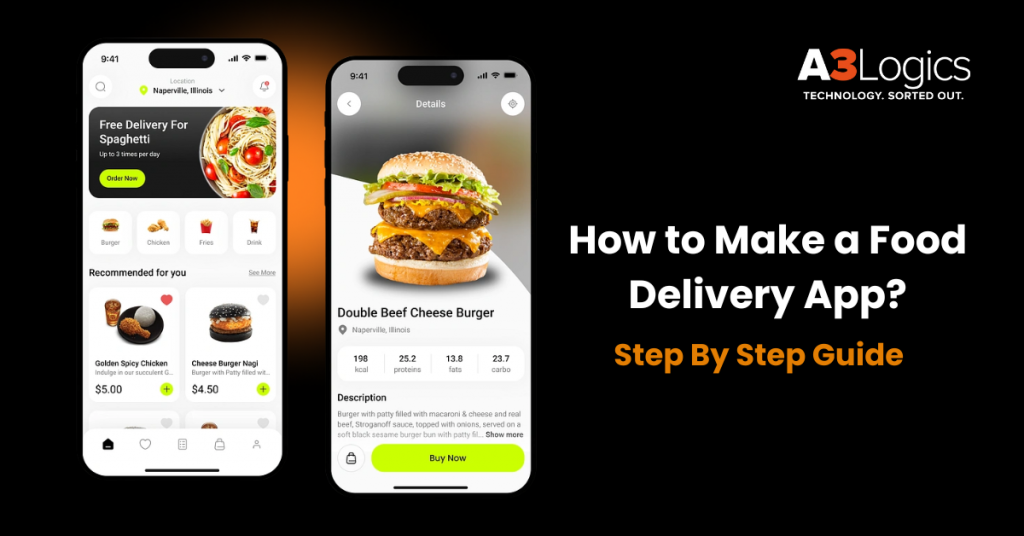
In the age of convenience, food delivery apps have become a staple in our daily lives. Whether you’re craving pizza at midnight or need a healthy lunch delivered to your office, food delivery apps make it possible with just a few taps. If you’re an entrepreneur, restaurant owner, or investor looking to enter this booming market, knowing how to make a food delivery app is crucial.
This guide breaks down every step involved in how to make a food delivery app—from conceptualization to launch—ensuring your app not only works but thrives.
What is a Food Delivery App?
The process of how to build a food delivery app involves basically creating, producing, and deploying a mobile app that lets people buy food online from restaurants, cloud kitchens, or home cooks and then have it delivered to their door. When you learning how to to build a food delivery app remember that a food delivery app has three key parts:
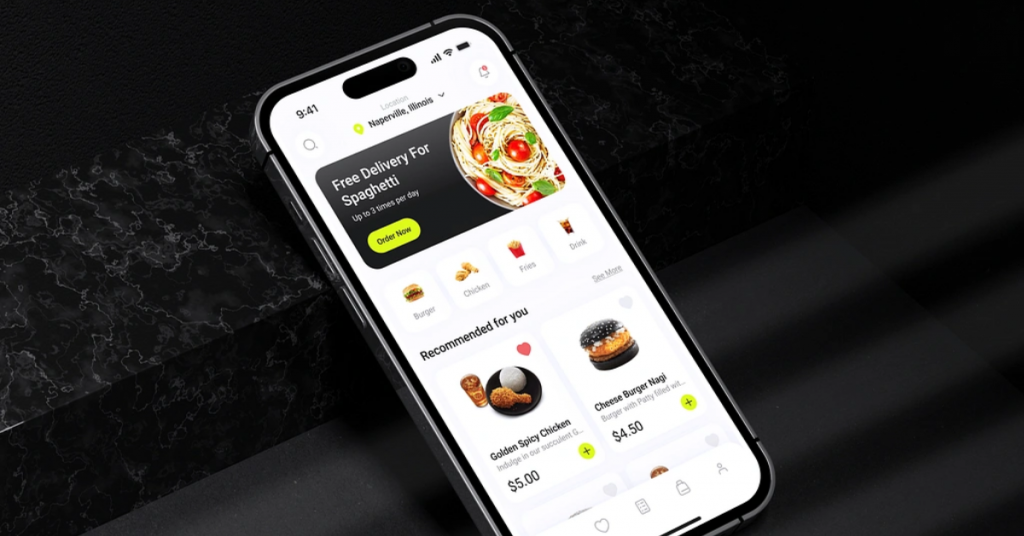
Customer App – The Customer App lets people look at menus, place orders, pay for them, and keep track of deliveries.
Restaurant Dashboard – This tool helps restaurants keep track of orders, alter menus, and see how much money they are making.
Delivery Partner App – This app helps delivery drivers get orders, find their way, and make deliveries.
A meal delivery software needs to provide a smooth user experience, real-time tracking, safe payments, and easy order management to be successful. Also, businesses need to add food delivery app features like – AI-driven suggestions, GPS monitoring, several ways to pay, and updates on orders in real time.
While understanding how to make a food delivery app, you need to plan carefully, choose the correct food delivery app technology stack, and hire a talented development team. All of these things are necessary to make sure the app runs smoothly and can grow with your business.
Food Delivery Market Overview & Key Challenges
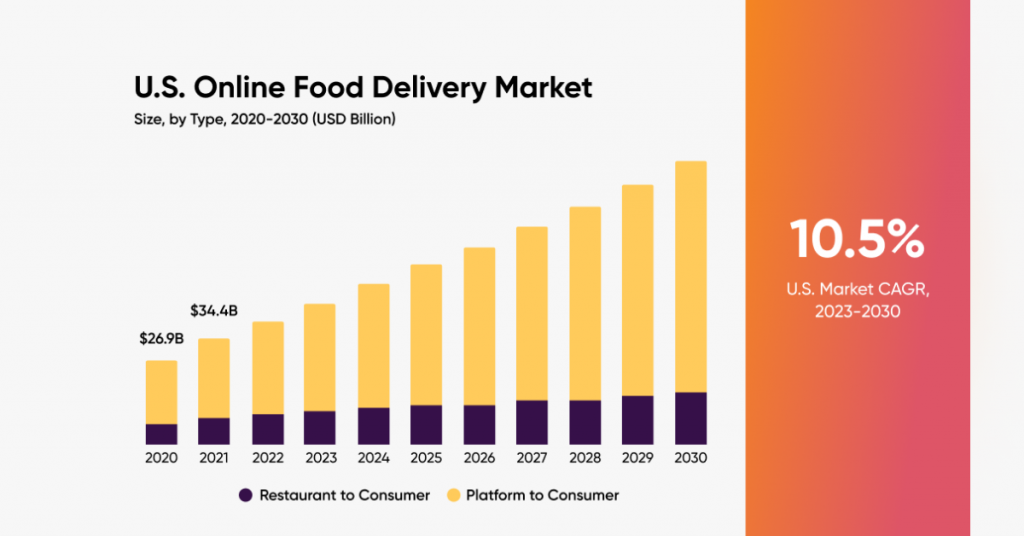
Current Market Trends and Statistics
The global food delivery market is booming, projected to reach over $2 trillion by 2030, driven by busy lifestyles, smartphone penetration, and changing consumer preferences. North America, Europe, and parts of Asia lead the market, with players like Uber Eats, DoorDash, Zomato, and Swiggy dominating the space.
Competitive Landscape
The sector is hyper-competitive. Alongside established giants, many regional startups are carving niches through hyperlocal delivery, healthy meal options, and subscription models. New entrants must offer unique value propositions to stand out.
Key Pain Points
- Logistics Management: Ensuring on-time delivery and quality.
- High Competition: Established players make market entry challenging.
- Customer Retention: Users often switch apps based on offers.
- Restaurant Partnerships: Convincing restaurants to list on your platform.
- Profitability: Balancing delivery costs with margins.
Step-by-Step Process to Develop a Food Delivery App
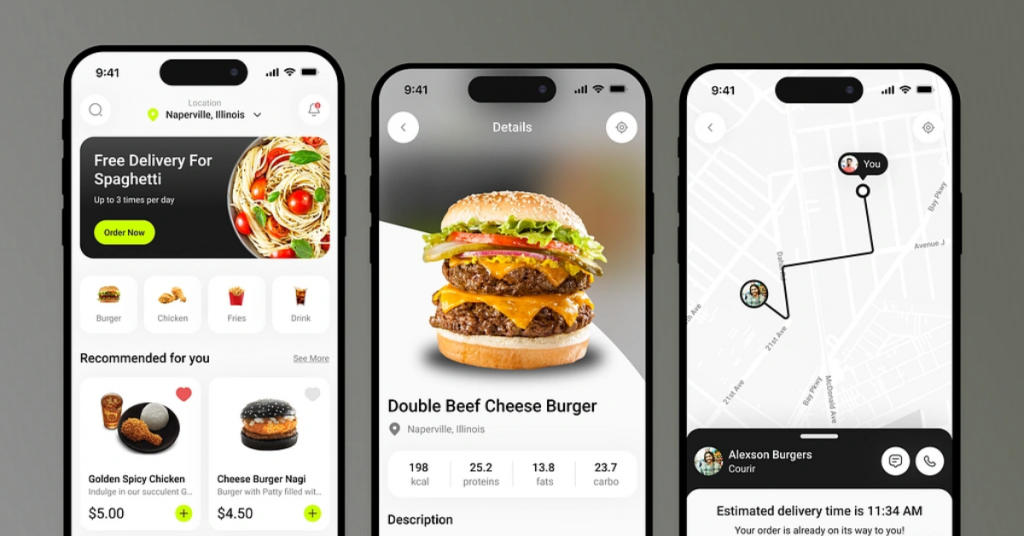
There is a lot of competition in the on-demand food delivery business. So how to build a food delivery app that people will want to use? Here is the full procedure for making an app that delivers food.
Step 1: Conduct In-Depth Market Research
The first step in how to make a food delivery app is to do market research. It will help you know who your competitors are, what your customers want, and how to make smart choices while building a successful app. Also, market research will help you figure out what your competitors are doing. You can look at their features, user experience, pricing tactics, and customer reviews to see if there is still a gap in satisfying the needs of customers.
The idea of on-demand food delivery applications isn’t new; the first online meal ordering business, Worldwide Waiter (now waiter.com), debuted in 1995. Since then, this market has been growing steadily.
But what makes the greatest food delivery apps so appealing and hard to stop using?
Of course, the main reason is convenience, but other things like discounts, a wide range of alternatives, and easy payments are also helping it develop. These food delivery app features have made food applications so addicting that most people now choose to order food online instead of going to the restaurant.
Did you know that restaurant owners think that offering food delivery can increase their business by 60%. Before you dive into build a food delivery app you need to understand the following:
- Target Audience Behavior: Understand their dining and ordering preferences.
- Regional Demands: Different areas may have different cuisine preferences.
- Competitor Analysis: Evaluate features, business models, and gaps in existing apps.
- Market Gaps: Identify unmet needs—like vegan meals, late-night delivery, etc.
Use tools like Google Trends, Statista, and user surveys to gather insights.
Step 2: Choose a Business Model
Choosing the right business strategy is the next important step in how to make a food delivery app. Think about other options, like an aggregator strategy, where you work with a lot of restaurants and offer a lot of choices, or a logistics-focused strategy, where you only focus on delivery services for restaurants that don’t have their own drivers.
You might even go with a completely integrated approach, where you work with cloud kitchens or offer delivery services in addition to having your own kitchen. The food delivery app business model should fit with your target market, the competition, the resources you have, and the total value you offer. This will help your app be successful and last.
As a new business, in how to build a food delivery app is you should realize that there are mostly two kinds of food delivery apps:
> Restaurant To Consumer Model
You can make a smartphone app for your restaurant, grocery store, or supermarket so that consumers can order things and have them delivered right to your door. You can avoid paying third parties and commissions with this model, but you need to spend more money up front to develop and support the delivery app and hire drivers.
It is a better choice for big chains of restaurants and stores. For instance, more than 70% of Domino’s sales come from digital ordering methods, such as their mobile apps.
> Aggregator Model
The Aggregator food delivery app business model has already taken over the food delivery sector by making it easy for customers to get their food. With platform-to-consumer delivery apps, many local eateries may put their menus, deals, and specials on one platform. Also, users may look for restaurants, order food, and have it delivered immediately.
These are meal delivery aggregators, like Glovo or Uber Eats. If you want to make an app that lets people order meals from multiple restaurants and have it delivered right away, this is the way to go. One interesting thing about this concept is that you can use it for various types of delivery, such as groceries from supermarkets or C2C delivery. For example, Uber is working with a company that sells food service equipment.
Step 3: Estimate the App Development Cost
Cost is very important for a startup or any other firm. You need to make sure it fits with your budget. It’s hard to figure out the cost to build a food app because you have to think about things like the app’s complexity, maintenance, the platform it will run on, the software and technology needed, and the team you will recruit to make the app.
The typical cost to build a food app is between $15,000 and $60,000. But this can change much more based on the criteria listed above. So, it’s very vital to pick the proper provider that meets your budget.
But why does the price change so much? What else affects the cost to build a food app? The answer is the features of the app. You need basic and advanced functionality for all four apps—customer, service provider, admin, and delivery agents—to make a food delivery app that works well. The prices can vary on the basis of the following factors
- Design Complexity
- Feature Set
- Platform (iOS, Android, Web)
- Development Team Location
- Time to Market
| Component | Estimated Cost |
| UI/UX Design | $5,000 – $15,000 |
| Backend & APIs | $10,000 – $25,000 |
| Android App | $8,000 – $20,000 |
| iOS App | $8,000 – $20,000 |
| Admin Panel | $5,000 – $10,000 |
| QA & Testing | $5,000 – $10,000 |
| Total | $40,000 – $100,000+ |
Step 4: Define the Core Features of the App
A robust feature set is the backbone of a successful food delivery app. Let’s break the features on how to build a food delivery app down:
4.1 User App Features
Good features are important when it comes to ensuring that your consumers are happy. Offering them advanced features like AI, ML, etc. can help with building customer loyalty. Let’s take a look at some of the features that are important for ensuring customer satisfaction and boosting consumer retention.
> Simple Sign-Up/Login
Users can sign up and log in quickly with their email address, mobile number, or social media accounts such as Google or Facebook for a seamless start.
> User Profile Management
Users can update personal information like name, contact info, saved addresses, preferred payment accounts, and purchase history from a single profile dashboard.
> Geolocation & Address Saving
Auto-detect location with GPS or manually specify an address. Users can store several delivery addresses (home, office, etc.) for quicker checkouts.
> Restaurant/Dish Search
Searching with filters (cuisine, ratings, price range, dietary requirements) enables users to find restaurants or individual dishes with ease.
> Ordering with Cart Functionality
Add multiple items to a cart, add promo codes, select delivery/pick-up options, and confirm the order before paying securely.
> Secure Payment Integration
Multiple payment methods such as credit/debit cards, digital wallets (Paytm, GPay, Apple Pay), UPI, or cash on delivery — all securely encrypted.
> Order Tracking in Real-Time
Monitor order status in real time — from restaurant confirmation to food preparation and delivery — through interactive maps and ETA updates.
> Order Customization (Add-ons, Spice Level, etc.)
Adjust dishes according to likes such as spice levels, toppings, sauces, and sides. Add instructions for allergens or special dietary requirements.
> In-App Chat Support
Real-time chat with customer care for order inquiry, refund, or feedback — for seamless user experience.
> Ratings & Reviews
Users can post ratings on food quality, delivery, and experience after they have received an order. Written feedback assists in informed decision-making.
> Push Notifications for Order Updates & Promotions
Receive real-time order status updates, delivery time, special offers, and discounts through customized push notifications.
4.2 Restaurant App Features
Whether it is a rush hour on a Sunday or a slow Monday, restaurants need features and solutions that are simple, yet comprehensive. In order to deliver flawless services clients need food delivery apps solutions that solve the mundane problems. Let’s take a look at what are the features that are important to have in a restaurant app.
> Restaurant Dashboard
A full-fledged restaurant interface to see new, active, and done orders, monitor sales performance, and keep track of customer ratings.
> Profile & Menu Management
Quickly edit restaurant information (hours, address, photos), and control the digital menu — prices, descriptions, images, stock levels, and categories.
> Order Management System
Accept, prepare, and send orders with efficient real-time notifications and status updates, for timely service.
> Payment Handling
Monitor all payments made through the platform, view transaction history, and initiate settlement or withdrawal to bank accounts.
> Customer Support Chat
Deal with customer questions or special requests directly through the app, enhancing service quality and customer happiness.
4.3 Delivery Partner App Features
Delivery partners need features that are not complicated offering multilingual options. These are just some of the must have features for any delivery partner app features. In this section we have compiled a list of features that should be a part of any how to build a food delivery app.
> Sign-Up & Profile Verification
Delivery partners can sign up and submit required documents (ID, license, bank account details) for verification prior to activation.
> Order Management
See assigned deliveries, accept or reject orders, monitor delivery progress, and mark deliveries as done — all from a single intuitive screen.
> Real-Time GPS Navigation
Embedded with Google Maps or Mapbox, drivers get optimized routes for fast pickups and on-time deliveries.
> In-App Communication with Customers & Restaurants
Call or chat with customers or restaurant staff to get delivery instructions, address corrections, or order issues.
> In-app Earnings Dashboard with Weekly Payouts
Delivery partners can see completed orders, total earnings, incentives, and get weekly payments into their bank account.
4.4 Admin Panel Features
The heart of soul of any delivery app is the admin panel. That needs to be easy to understand yet comprehensive all at once. For this it is important to leverage the latest technologies to make this simple – let’s take a look at some of the must-have features that any admin panel of a food delivery app must-have.
> Admin Dashboard Overview
Get a bird’s-eye view of platform action, including total orders, revenue, user signups, real-time deliveries, and system performance metrics.
> User, Restaurant & Delivery Partner Management
Add, edit, or delete users, restaurants, and drivers. Monitor their activity, resolve disputes, and ensure compliance with platform policies.
> Analytics & Reports
Gain in-depth insights on revenue, order volume, best-selling items, delivery efficiency, user retention, and app engagement to fuel business expansion.
> Delivery Fleet Management
Monitor delivery partner availability, location, and order assignments. Align fleet allocation and detect delivery bottlenecks.
> CMS for Promo Banners & App Content
Control homepage banners, in-app promotions, referral campaigns, FAQs, and static content — all through a robust content management system.
Step 5: Select a Revenue Model
Now that you know what a food delivery app is and what are some of the must have features that you must add in your food delivery app. But how are you going to monetize it and earn money from it? A strong revenue model for food delivery app ensures financial sustainability. Common food delivery app business model strategies include:
Delivery Fee Per Order:
The most common revenue model for food delivery app is to make money by charging delivery fees. There may be a set delivery price or a fee that changes based on how far away the client is from the restaurant.
Restaurant Commission:
It’s a reliable way to make money. You can set a fixed commission charge based on the size and popularity of the restaurant, and you can alter it based on how many orders a restaurant gets. So, the restaurant can charge a certain amount for each online order.
In-App Ads or Promotions:
A good revenue model for food delivery app is to charge for advertising. Restaurants would like to get more people to know about their brand on food delivery apps, and one method to do this is to make good commercials. They can be paid a service fee to help them get more consumers via promotion.
Restaurant Subscriptions:
Some food delivery apps work with establishments to offer special promotions or partnerships. These relationships include agreements to share profits, where the meal delivery app gets a cut of the money made from these partnerships.
Mixing multiple streams often yields better long-term results for enhanced return on investment.
Step 6: Hire a Reliable App Development Company
It’s really important to choose the correct partner while making an app. The team you choose to build your app will have a big effect on how well it works and how users feel about it.
When choosing an app development partner, think about these things:
1. Experience: Look for a group that has a history of making apps that work. Having worked in your field or specialization before might also be an advantage.
2. Expertise: Make sure the team has the abilities they need to build your project, like knowledge of frontend and backend programming, API integration, and database management.
3. Communication: For a partnership to work, you need to be able to talk to each other clearly and honestly. Make sure the staff you hire is quick to respond and can communicate properly and efficiently.
4. Flexibility: Making an app can be hard, and things can alter along the way. Find a team that is open to new ideas and can handle shifting demands.
Step 7: Design an Intuitive & Engaging UI/UX
The layout should be easy to use, make sense, and look good. It should include basic features like easy navigation, the ability to search for restaurants and menu items and filter choices, a quick and safe ordering process, real-time order tracking, and useful payment options.
A good app should also include the many interests of its users, such as customizable profiles, personalized recommendations, and easy interaction with social networking sites so that people can easily share and rate their dining experiences. A design strategy that focuses on the user can make the overall experience better and make your food delivery app more likely to be successful. A well-designed interface can drastically improve user retention. For the best results you can focus on:
1. Simple Design: Less Is More
The app’s design will have a simple, clean layout that is all about minimalism. Reducing visual noise and maintaining only the most important details, users can easily locate what they need — from navigation menus to monitoring orders. White space, delicate typography, and simplified components make it easy to read and understand.
2. Rapid Load Time
Performance takes precedence. Light code, optimised images, and efficient backend design mean that each screen takes seconds to load — even on less-than-smart connections. A responsive experience has a positive impact on user retention, fewer bounce rates, and facilitates effortless browsing from discovery through checkout.
3. Consistent Branding
From splash screen to order confirmation, the app will have a consistent visual identity. Careful use of color schemes, fonts, button styles, and iconography build brand recognition and trust. Regardless of whether the user is on the customer app, restaurant panel, or delivery interface, the design language does not change.
4. Easy Navigation
The interface will be optimized for highest usability, with easy-to-understand tab bars, well-tagged icons, and rational screen flow. Users can transition seamlessly among search, cart, profile, and order tracking with few taps. Navigation conforms to familiar patterns to avoid confusion and simplify app use.
5. Micro-interactions for Feedback
Small yet significant animations — such as a pleasing “Order Placed” checkmark, a cart shake upon adding products, or a delivery progress bar — provide immediate feedback and increase user engagement. Micro-interactions create the experience as human, responsive, and rewarding.
*Tip – Use Figma or Adobe XD for prototyping and A/B testing.
Step 8: Integrate Third-Party Services
It allows the app access features and services that are already there, which makes the user experience better and speeds up procedures. There are several third-party services that can be added, such as payment gateways for safe transactions, mapping and geolocation APIs for exact tracking and delivery, SMS or push notification systems for order updates, and restaurant APIs for getting access to menus and inventory data.
By combining several services, the app may make interactions between clients, restaurants, and delivery people smooth and effective, making it more useful and feature-rich. Third-party tools speed up development and enhance functionality. You can opt for the following third party integration services in how to make a food delivery app:
- Payment Gateways: Stripe, PayPal, Razorpay
- SMS & Email Notifications: Twilio, SendGrid
- Maps & Geolocation APIs: Google Maps API, Mapbox
- Analytics Tools: Firebase, Mixpanel
These integrations improve reliability, speed, and scalability.
Step 9: Test the Beta Version
Testing is an important part of how to make a food delivery app. In-depth user acceptance testing and quality assurance help detect and fix any bugs, faults, or usability issues. The user interface, functionality, performance, security, and compatibility with different hardware and operating systems are all things that need to be tested thoroughly.
By thoroughly testing the software, developers can make sure that it is stable, safe, and gives users the greatest experience possible. This will lead to a successful and reliable food delivery business. Remember never launch without rigorous testing. Focus areas for beta version testing include:
- Functionality Testing: Ensure all features work smoothly.
- Performance Testing: Load time, speed under traffic spikes.
- Security Testing: SSL, data protection, secure payments.
- UI/UX Testing: User feedback via beta testers.
- Bug Fixes: Resolve before launch.
Use tools like TestFlight (iOS), Firebase Test Lab, and Postman for API testing.
Step 10: Launch and Market the App
The last step in how to make a food delivery app is to launch it and sell it well. It includes making a detailed marketing plan that covers branding, promoting the business both online and offline, interacting with customers on social media, and working with other restaurants in the area. It’s also important to make an app that is easy to use, looks good, and has safe payment options.
By setting up good customer care channels and getting input from users, you can keep making the app better and better for everyone. Finally, data analytics will assist keep an eye on crucial metrics and make decisions based on data for personalized marketing campaigns and app upgrades.
> Launch Strategy
Keep your launch strategy simple, here are some of the things you can follow while launching your app into the market.
- Soft Launch: Start in a smaller market or city.
- Feedback Loop: Incorporate real-user feedback.
- Iterate Quickly: Resolve issues fast and scale gradually.
App Store Optimization (ASO)
The next important phase while launching any app is uploading it in the iOS and android app stores. Here are some of the tips you need to remember before you release your app into any of the app stores.
- Keyword-rich title and description.
- High-quality screenshots and videos.
- Positive reviews and high ratings.
> Marketing Strategy
The launch is just the first step into a successful launch. Once the app is launched and you have followed the following steps, then begins that marketing campaign here are some of the important things you can follow after the launch
- Social Media Campaigns
- Influencer Collaborations
- Paid Ads on Google, Facebook, Instagram
- Referral Programs: Referral Programs Give users discounts for referring friends.
Turn Your Food Delivery App Idea into Reality with A3Logics
One of the important things before you go into investing in food delivery app you need to find the right partner. A3Logics is one of the leading app development companies, expert in offering technological advanced solutions. If you’re serious about launching a market-ready, scalable, and user-friendly food delivery platform, working with a trusted development partner like A3Logics can make all the difference. With years of experience building custom apps for food businesses, they offer:
- Dedicated project managers
- Transparent pricing
- Full-cycle development
- Ongoing support and updates
From ideation to launch and beyond, A3Logics brings your food delivery app vision to life with precision and innovation. Get in touch with our experts today to take the first step in how to make a food delivery app and your food delivery app journey.
Conclusion – How to Make a Food Delivery App
Learning how to make a food delivery app is the first step toward entering one of the most promising digital markets today. While competition is fierce, a strategic approach—backed by research, the right food delivery app technology stack, clear monetization, and expert development—can set you apart. Whether you’re a solo entrepreneur or an enterprise restaurant chain, now is the time to invest in building your food delivery platform.
Need help transforming your idea into a fully functional app? Reach out to the Food Delivery App Development Company that industry leaders trust—A3Logics.