Still drowning in thousands of paper or PDF invoices? If yes, then it’s costing you more than time, it’s affecting your working capital too. Did you know that it takes approximately one hour to process five invoices per hour manually? And the cost can be anywhere from $14 to $20. How many invoices does your organization process in a day? Ineffective invoice processing wastes resources, adds risk, and keeps your AP team stuck.
The right invoice automation software can turn all that around, delivering speed, accuracy, and cash control to even the most intricate environments. Automated invoice processing system development automates invoice processing from start to finish – from data capture and validation of invoices to approval and routing for payment and posting of invoices to the general ledger (GL).
Automated invoice processing systems are particularly useful for big corporations that need to process a large number of paper and electronic invoices.
In this blog, we explore the typical ache points Finance teams have around automated invoice processing system development, and the key capabilities best invoice invoice automation software solutions provide, so you’ll know what to look for.
Invoice Processing Automation in a Nutshell (Overview)
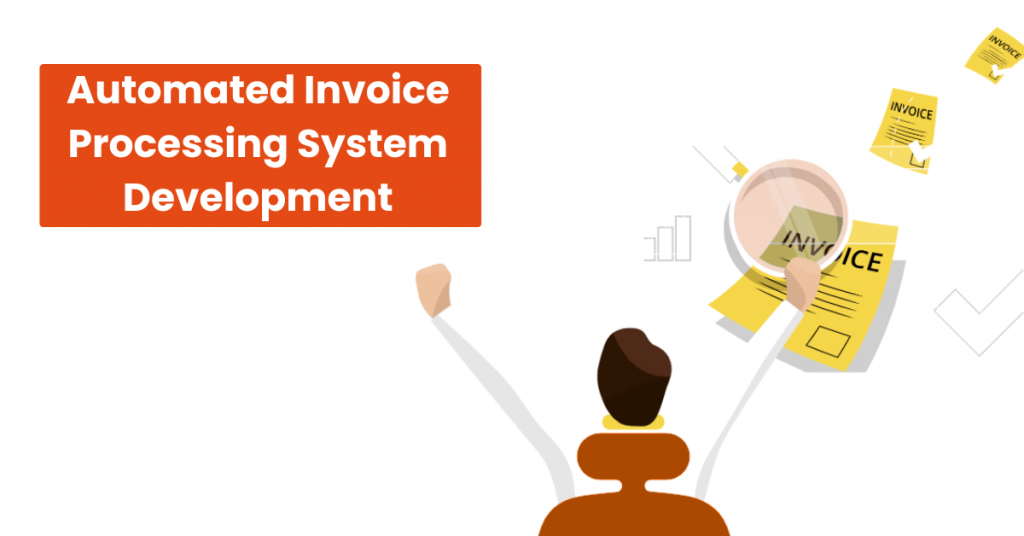
Automated Invoice Processing is a mechanism that facilitates the streamlining of accounts payable procedures by processing the invoices automatically. At the same time, it also updates the data in your Enterprise Resource Planning (ERP) system to keep all of the records electronically maintained. Modern businesses can leverage invoice to cash automation software to further accelerate processing, reduce errors, and connect invoice workflows directly to cash management for faster financial visibility.
Automated invoice processing system development works to significantly lower the duration for processing the invoices manually and also serves to lower the error margin that manual tasks present.
Main Invoice Processing Tasks to Automate
> Invoice capture and validation
Lean on AI, OCR, and RPA technologies to achieve 95% faster and more accurate invoice data capture, extraction, and validation with zero manual intervention.
> Invoice approval workflows
With automated invoice processing system development you can enjoy 80%+ acceleration in invoice approval with automated multi-department approval workflow and ease of 24/7 remote access for the approval teams.
> Invoice analytics and reporting
Use ML to accurately predict invoice amounts and drive budgeting. Receive AI-driven recommendations on the best invoice payment dates to avail vendor discounts.
Eye-Opening Invoice Processing Statistics
There are various aspects of invoice processing, and these stats are a proof of how there is a rapid need for automated invoice processing system development.
Invoice Processing Inefficiencies: Alarming Stats
- Almost 40% of invoices are error-ridden under manual operations due to incorrect amounts, discrepancies, or repeat entries.
- Manual processing of an invoice takes an average of 14.6 days, point out how painstakingly slow manual processes can be.
- Manual processing costs between $10 to $16 per invoice considering labor, scanning, corrections, and overheads.
- Manual invoice error rates range about 1.6% per invoice—quickly adding up in organizations dealing with high volumes.
- 86% of small and mid-size companies continue to key in invoices manually, which carries inefficiencies, delays, and risk.
- In 2024, a mere 60% of invoices were still being keyed manually into ERP or accounting systems (a decline from 85% in the past), which reflects that a large number of firms are making the move towards automation.
Trends Facilitating Automation Adoption
- AP automation, specifically using AI – has the ability to automate invoice processing by up to 70% and reduce costs by up to 60%.
- Automation reduces errors: errors in invoices can be removed by up to 80% after automation or AI software is implemented.
- Invoice processing through AI can reduce cost per invoice to around $2.36, and process up to 1–2 seconds quicker from 10–30 minutes.
- The world market for accounts payable automation is growing at a very fast rate — USD 3.07 billion in 2023 and projected to hit ~USD 7.1 billion by 2030 (CAGR ~12.8%)
- By 2024, 74% of the AP teams were automation-partially implemented, while only 7% were using AI. But 45% planned to become automation-completely implemented in the next 12 months.
- In retail & eCommerce verticals, for instance, AI-driven invoice processing adoption levels are already ranging up to 60% because of cost optimization pressures and high volume transactions.
Key Features of Invoice Processing Automation Software
1. Automated invoice capture
- Support for numerous digital invoice types (XML, PDF, digital pictures, e-invoices, etc.).
- Support for multi-table, multi-currency, and multi-page invoices.
- Paper invoices can be converted into a predefined digital format using OCR technology.
- Automated invoice scanning and capturing of numeric and textual invoice data.
- Machine learning-powered data extraction from digital bills.
2. Automated validation & fraud detection
- Automated invoice coding in the general ledger (GL).
- Automated two- and three-way matching of vendor invoices (with purchase orders, supplier contracts, goods/service receipts, and so on).
- User-defined tolerance, levels for – invoice matching.
- Invoice data is validated at the line item level using rules.
- Invoice verification against predefined tax regulations and region-specific e-invoicing compliance standards.
- Alerts for invoice exceptions (missing, mismatched, or inaccurate data, duplicate invoices, tax discrepancies, etc.) that require manual confirmation.
3. Invoice approval workflows
- Automatic invoice routing for – approval.
- Configurable multi-departmental invoice approval hierarchies (by invoice amount, invoice type, location, etc.).
- Scheduled email reminders for invoice approvers.
- A complete invoice approval history.
- Approved invoices are automatically routed for payment.
4. Invoice tracking & digital storage
- Real-time multi-departmental invoice tracking based on validation and approval status, type (PO, non-PO), supplier, period, and more.
- Automatic invoice routing for centralized storage.
- Rules for invoice keeping and deletion are configurable.
5. Analytics & reporting
- Calculating and tracking critical invoice processing data such as total number of invoices processed by period, average invoice approval cycle time, total amount of lost cash discounts due to late invoice submission for payment, and others.
- Trend analysis is used to forecast non-PO invoice amounts.
- Scheduled and ad hoc reporting on invoice processing key performance indicators.
6. Security and compliance features
- Invoice timestamping.
- E-signing of approved invoices.
- A complete audit trail for invoice-related actions.
- Digital invoicing fraud detection is based on rules, and powered by AI.
- Multi-factor user authentication.
- Role-based access control.
Essential Integrations for Automated Invoice Processing Systems
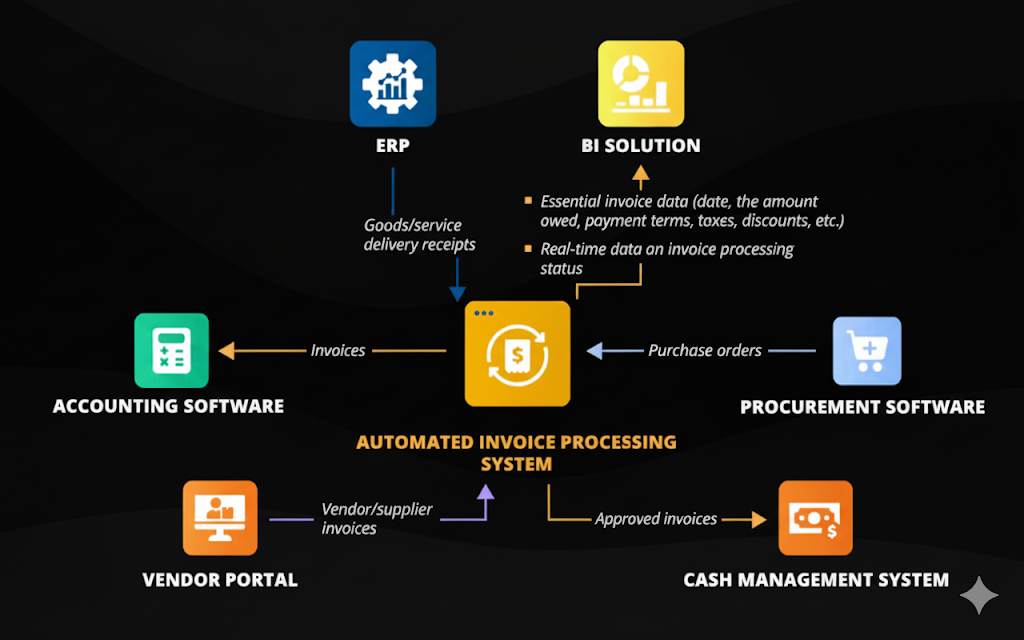
Automated invoice processing system development performs optimally when integrated with the platforms and tools your company is already using. Correct integrations not only automate the workflow but also guarantee – accuracy, compliance, and efficiency throughout the entire accounts payable process. Some of these critical integrations are as follows.
1. Accounting Software
It integrates your invoicing system with accounting software so that all transactions are properly recorded in real-time. It eliminates manual entry, reduces errors, and allows finance teams to maintain up-to-date financial records, while speeding up the reconciliation and reporting procedures.
2. Procurement Systems
Integration with procurement systems allows it to automatically match invoices to purchase orders. This streamlines approvals, quickens the procure-to-pay cycle – and reduces manual intervention, allowing organizations to maintain purchasing processes smoothly while also improving supplier relationships.
3. ERP Platforms
Combining automated invoice processing system development with ERP systems allow invoice data to be central to business processes. This gives complete visibility into financial process and better decision making for enabling end to end workflow automation. Ranging from invoicing to payment.
4. Vendor Portals
Integration with vendor portals allows invoices to be accepted directly from the suppliers – with automatic verification of the vendor data. With this we can streamline approval cycles, reduce errors in the manual process for a more transparent and effective communication with the suppliers.
5. Cash Management Systems
Integration with cash management software gives finance organizations real-time visibility into cash flow, outstanding payments, and liquidity positions. It assists in timely payments, accurate forecasting, and enhanced working capital control, which are crucial for business stability.
6. Business Intelligence (BI) Tools
BI software combined with invoice processing systems offer better analytics on finance information. Organizations can monitor – KPIs, identify trends, and develop actionable insights that support data-driven decision-making in – procurement, accounting, and financial processes.
Success Factors for Invoice Processing Automation
To reap the most from automated invoice processing system development – it’s essential to pay close attention to the following important factors.
1. OCR capabilities
Optical Character Recognition technology is pretty important for reading and extracting pertinent information. Especially when there are a tonne from paper invoices and scanned documents. Through data entry automation, OCR reduces errors made by humans, saves time, and guarantees that essential details: like vendor name, invoice number, amount, and terms of payment, are correctly entered into the system.
2. Mobile access
Mobility is something with which we cannot compromise in the competitive business environment. Stakeholders can track, review, and approve invoices anywhere-anytime with mobile access. Managers can remain connected and invoice workflows flowing smoothly whether they are – in the office, on the road, or working remotely.
3. Invoice prioritization powered by AI
AI in invoice processing introduces an element of smarts by – inspecting invoice information to prioritize payments and approvals strategically. It will thus make businesses not only pay invoices in a hurry but also maximize cash flow through taking advantage of opportunities like early-payment discounts. Using AI-based prioritization – businesses can reconcile payment responsibilities with cost-saving programs to achieve improved financial results.
4. Cloud deployment
Cloud-based invoice processing solutions offer scalability and centralization of digital storage to store many invoices easily in a safe manner. Cloud deployment makes employees available 24/7 from any geographical location to review and approve invoices quickly. Cloud deployment provides better team collaboration and business continuity with reliable backup and recovery capabilities.

How to Automate Invoice Processing: Step-by-Step Development Guide
1. Business Requirements Analysis & Requirement Gathering
Start with discovering your company’s invoice processes and learning existing bottlenecks like – late approvals, manual mistakes, or adherence issues. This is the step of involving finance, procurement, and IT stakeholders to collect requirements. Setting objectives – like cutting cycle times, decreasing costs, or increasing transparency. This forms a roadmap for a successful automated invoice processing system development .
2. Design System Architecture, Features, and Tech Stack
Once requirements have been defined correctly; the next stage is system design. Decisions here include cloud vs. on-premise deployments, databases, OCR engines, and AI/ML models. The key features are; automated invoice capture, routing for approval, integration capability and real-time reporting. Having the correct tech stack can enhance – scalability, flexibility and future-readiness.
3. Plan the Project
Project planning decides the boundaries of the automation project. This means defining the scope, setting deliverables, estimating timelines, and allocating budgets. This also covers selecting the right team structure with; business analysts, developers, QA testers, and project managers. Well-planned strategy ensures responsibility and successful implementation.
4. Create Custom Invoice Automation Software
Once the plan is completed – the developers start writing the code for the software. This may involve creating simple-to-use dashboards, AI-enabled invoice recognition modules, and workflow automation modules. Security features like data encryption and role-based access are implemented during development to protect confidential financial data.
5. Perform Quality Assurance Testing
Comprehensive testing ensures the system performs perfectly. Main features like – functional testing, integration testing with existing tools, heavy load performance testing, and security testing for weaknesses are all covered. QA makes the automation solution deploy-ready and stable.
6. Migrate Existing Invoice Data
Legacy invoice data must be carefully moved to the new system. Data migration often involves cleaning, formatting, and validating history for correctness. Smooth migration enables employees to access previous and new invoices through a single platform.
7. Integrate with Accounting, ERP, and Other Systems
Integration is the secret to maximum value in automation. The solution should integrate easily with accounting systems, ERP systems, purchasing systems, vendor portals, and cash management systems. This facilitates smooth data exchange, real-time updating, and end-to-end financial visibility.
8. Employee Training for Adoption
Success with automation depends largely on user adoption. Employees need to be trained to properly use the new system – understand automated workflows, and work with reporting dashboards. Training dispels resistance, builds confidence, and guarantees faster ROI.
9. Provide Ongoing Support & Solution Improvements
Invoice processing automation cannot be a one-time configuration. Regular monitoring, regular updates – and the addition of new features have to be implemented in order to achieve long-term success. Support teams also need to address user issues and respond to user concerns so that the system continues to function as expected.
Implementation Costs for Automated Invoice Processing Systems
| Factor | Description | Impact on Cost |
| Features | Core modules (OCR, approval workflows, dashboards) vs. advanced features (AI prioritization, analytics, mobile access). | More advanced features increase development and licensing costs. |
| Integrations | Connection with accounting software, ERP, procurement, vendor portals, BI tools, etc. | The more integrations required, the higher the cost and complexity. |
| Customization | Tailoring workflows, dashboards, and reports to fit business processes. | High customization significantly raises implementation costs. |
| Deployment Type | Cloud-based (subscription, scalable) vs. On-premise (hardware, licenses, IT maintenance). | Cloud is cost-efficient upfront; on-premise requires higher initial investment. |
| User Volume | Number of employees accessing the system regularly. | More users lead to higher subscription tiers or licensing fees. |
| Support & Maintenance | Post-deployment training, upgrades, and technical support. | Ongoing costs vary depending on service level agreements. |
Benefits & ROI of Invoice Processing Automation
Annual ROI on a Custom invoice processing software development can be as high as 460%. Average payback time for one such solution is approximately 6 months.
> Cost savings
Total automation of invoice capture, validation, approval, and payment processes results in up to 90% cost savings on invoice processing due to saved employee efforts.
> Improved employee efficiency
By streamlining the invoice processing cycle, you liberate your AP professionals from low-value manual drudgery, which means an up to 4x boost in the productivity of the team.
> Quicker invoice-to-pay cycle
Automation reduces the time taken to process an invoice from 45 days to under 5 days and makes specific invoice-related operations up to 12x quicker.
> Early payment discounts
AI-driven recommendations for the best invoice payment order avoid payment delay and capture vendor discounts – generating 1–3% cost savings for large businesses.
> Better accuracy
Automated processing of invoices erases human mistakes throughout the invoice reconciliation and payment planning processes, resulting in reduced invoice and payment differences.
> Streamlined compliance
Automated invoice processing makes it easy for you to validate invoices and processing streams against required legal standards. It assists in preparing more effectively for financial audits and avoiding compliance gaps.
Why Build Your Invoice Processing Automation System with A3Logics?
At A3Logics we assist CFOs to deliberate on such decisions on a daily basis. When customers are looking to implement Automated invoice processing system development, our experts begin by getting to know their particular scenario—the complexity of their processes at present, the software they operate and the nightmares that haunt them.
We’re not merely offering AI Development Services or automating redundant processes. We’re supporting your staff to ensure you determine the best time, understand the actual implementation difficulties and ensure that any automation positively enhances your cash management.
- Our team of experts offer consulting for automation strategy that is custom to your business needs and requirements.
- Get expert custom software development services & end to end implementation for a seamless experience.
- We offer seamless integration services for implementing our custom solution with your existing systems and get support services for a smoother experience.
Conclusion
In today’s business world, it’s not simply sales, marketing, or operations that are looking for the best technological stack. In a world where many people work from home, financial departments are also looking for the best automated invoice processing software to provide them greater control over their internal procedures. Financial leaders want to keep their present procedures even if their workforce is spread out. They want to add features like smart approval routing with context to make invoice input and coding easier.
Accounts payable isn’t a profit center, so departments search for other ways to provide value. The secret to adding value is to become more efficient, which includes saving time and cutting costs.