Are you still using a static poster or an outdated display for your business promotion?
If you are, then you are probably spending more time updating static content than actually engaging with your customers, employees, or stakeholders. It’s not just you; many organizations are still using traditional signage and have yet to adopt digital signage.
Digital signage has become an effective method for organizations to communicate with their stakeholders, employees, and customers. As stated by Precedence Research, the worldwide digital signage market is expected to expand from $29.19 billion in 2025 to $54.69 billion by 2034.
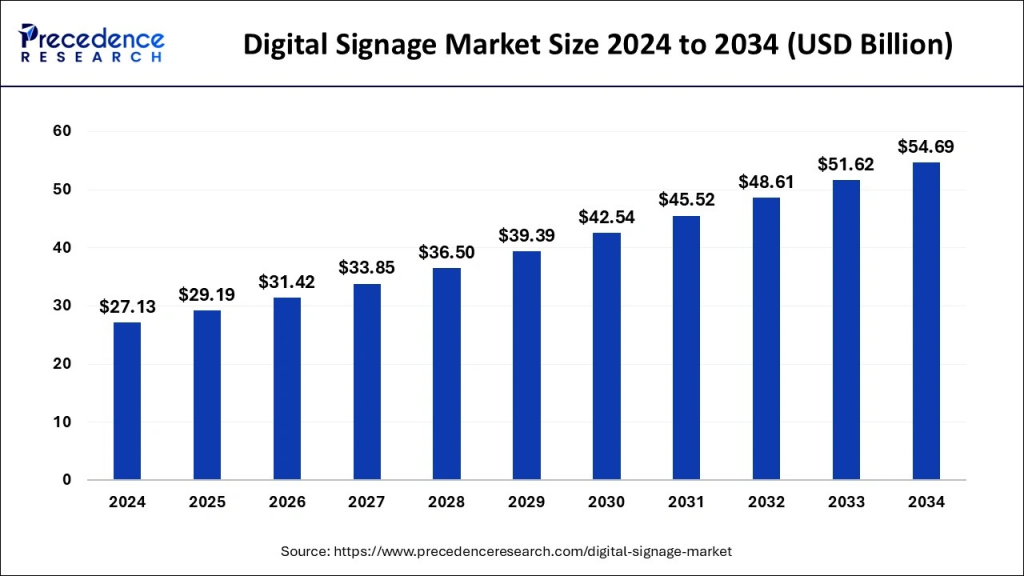
The remarkable growth not only illustrates the pervasive demand for digital signage software but also provides a clear indication of the widespread adoption of this advanced technology in sectors such as retail, healthcare, and transportation.
Digital Signage Software Development now goes far beyond simple content display. Enterprises expect robust capabilities for cloud management, analytics, interactive experiences, and secure integrations with enterprise systems. Decision makers are also compelled to assess costs, advancing technologies such as AI, and best practice approaches to development.
This guide will help develop a full perspective of digital signage systems, types, features, development costs, processes, and trends changing the market. Let’s begin!
What is Digital Signage Software and How Does it Work?
Digital signage software is the core of current display technology. This software empowers businesses to create, organize, schedule and deliver multimedia content to multiple screens from a single platform. A demo is usually comprised of the following architecture:
- Content Management System (CMS): This is the home for uploading all content and managing it.
- Player Software: This is downloaded to media players or smart displays so that scheduled content can be rendered
- Cloud or On-Prem Servers: This is where content will be stored if the business requires future use.
- Integration APIs: These connections can be used with their CRM, ERP or POS to show some context-driven information.
Let’s illustrate this: First, they upload the content to the CMS, set the schedule for the time and location as they wish, and the player software automatically performs the operations and finally displays the content. The system also tracks the times and performances thus providing the businesses with the data for improving engagement of the content.
Why Are Businesses Investing in Digital Signage Solutions?
The key reasons are:
- Customer Engagement: As per Intel’s report, the introduction of digital signage boosts foot traffic by over 400% as compared with static types.
- Operational Efficiency: Automated content scheduling not only cuts costs but also eliminates the need for manual intervention.
- Revenue Growth: In retail, the use of digital signage can increase sales by as much as 29.5%.
- Workplace Communication: Corporations use digital signage for communication with the employees, safety information, and compliance messages.
- Data-Driven Decisions: The analytics approach to signage makes content performance measurement and adaptive strategies possible.
The combined outcome of these is a strong ROI case: industry data demonstrates that digital signage can recoup the investment in 18–24 months.
Different Types of Digital Signage Software for Enterprises
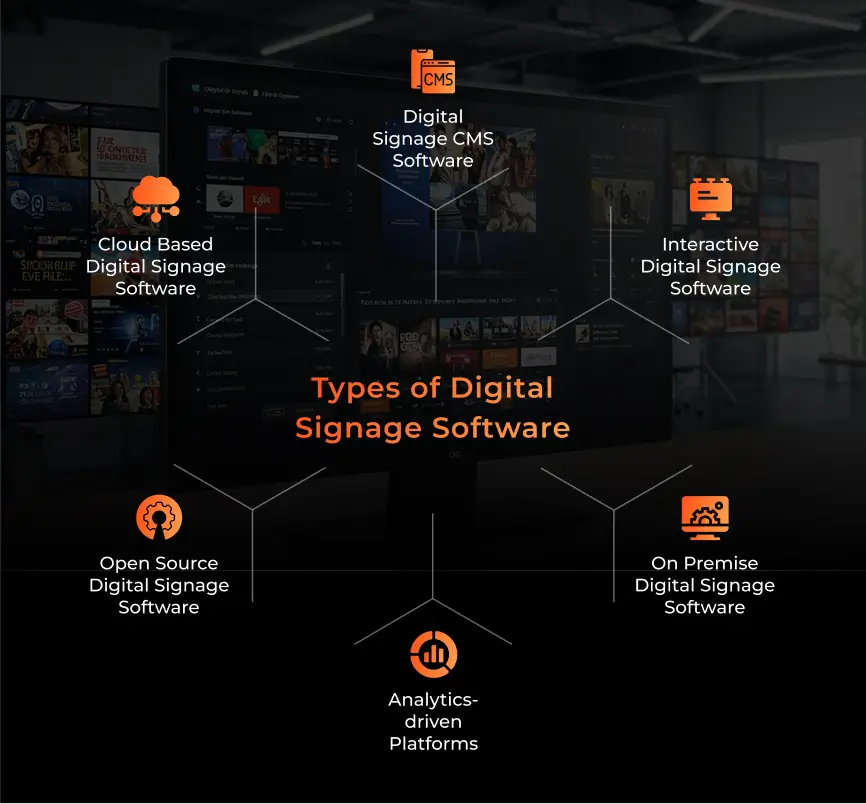
1. Digital Signage CMS Software
CMS centralizes the content creation, distribution, and management chain for all related processes. It thus enables the enterprise to control hundreds of displays remotely, preserving branding standards and/or compliance.
CMS platforms also include drag-and-drop scheduling, version control and multi-user permissions. This makes it easier for marketing and operations teams to work together.
2. Interactive Digital Signage Software
Interactive systems provide touch screens, QR codes, and other motion sensors. They are present in hospitals, retail fitting rooms, and at airports improving customer experience.
Interactive software is also integrated with mobile apps, loyalty systems, or payment gateways. It allows personalized and transactional experiences in real time. Companies can expect higher engagement and reduced staff workload by adopting these systems.
3. Analytics-Driven Platforms
These platforms can easily integrate with IoT sensors, Wi-Fi, or cameras to measure factors like dwell times and demographics. For example, Vistar Media offers programmatic advertising possibilities, enabling targeted ads to be driven by data.
This overall ensures that digital signage software solutions deliver better ROI.
4. Cloud-Based Digital Signage Software
Cloud based digital signage software is best when you don’t want to spend much on infrastructure. Cloud based systems are fast and enable real time updates from different locations.
These systems make sure that the content is delivered without any interruption. Cloud management not only cuts IT costs but also supports agility in campaign launching, a fact that is particularly visible in the case of companies operating across borders.
5. Open Source Digital Signage Software
Firms looking for a platform with high flexibility in the creation and development of systems could go for open-source ones like Xibo or Screenly OSE. But they are quite hard to customize and maintain.
Companies have full access to the source code, which means that they can create specific features and integrations that meet their processes. However, enterprises need to give attention to ongoing updates, bug fixes, and security patches that are of paramount importance for ensuring stability in the long run.
6. On-Premise Digital Signage Software
For highly regulated industries like healthcare or finance, the on-prem deployment is the ultimate way to go for higher control and compliance issues.
Such solutions mostly work better with the existing enterprise IT infrastructure, as they give the added protection of data privacy. Even if the upfront cost is higher, the companies that are serious about data security and offline performance still see the on-premise as the best.
Must-Have Features in Digital Signage Software Development
1. Cloud-Based Content Management
Remote management for the delivery of content to multiple locations is a must-have for many flagship companies. Cloud-based dashboards with easy drag-and-drop editors, version control, and publication kits are the preferred solution for these organizations.
Exceptional platforms are capable of previewing the content before deployment, user access logs, and providing multi-language support for the global workforce. For companies that are serious about Digital Signage Software Development, a robust infrastructure is a must.
2. Multi-Screen & Remote Control Capabilities
Businesses that are constantly growing often have to cope with managing networks of hundreds or thousands of screens scattered throughout different locations. Features such as remote diagnostics and centralized control reduce downtime and other service costs.
Modern platforms also have role-based management. For example, IT teams can focus on the technical aspects while marketing manages the creative part. These functionalities are crucial for maintaining a consistent brand image across all areas.
3. Real-Time Data Integration & Analytics
POS, CRM, or IoT device integration enables the delivery of contextual content. For example, a retail system can display flash promotions based on the current stock. On the other hand, the analytics dashboards can depict the data performance relative to the KPIs such as dwell time, CTR, and conversion rate.
In Digital Signage Software Development projects, AI powered analytics enable customers to see the relationship between the advertising and the sales, so enterprises can instantly change the message.
4. AI and Personalization Features
AI driven personalization is a key differentiator in 2025. Machine learning models give content on the basis of users’ demographics, the time of day, or their actions. Retailers can use predictive algorithms to change promotions quickly.
In addition to the retail sector, corporate firms can also leverage AI signage to personalize employee communications, thereby helping companies increase employee engagement.
5. Security & Compliance Management
When the screens are integrated into the company network, cybersecurity becomes critical. The network security measures that you can have are:
- Role-based access control
- End-to-end encryption
- GDPR and HIPAA compliance for sensitive industries
6. Advanced Scheduling & Automation
Advanced rule-based scheduling makes sure that the content is delivered at the right time and place. Meanwhile, automation handles time zones, event triggers, and seasonal campaigns, thereby reducing human error.
An example could include a QSR automatically updating its menu boards, removing or adding breakfast, lunch, or dinner hours. Another example is airports that change signs according to the arriving and departing flights, based on live data.
7. Interactive Features
Touch and voice-controlled signage can create many use cases in airports, QSRs, and other places. When integrated with mobile apps, the experience can become richer and more premium.
Businesses are now increasingly opting to use interactive signage in collaboration with loyalty programs, thus ensuring personalized offers and cross-channel engagement.
8. Scalable Multi-Platform Support
Having multiple options for operating systems such as Windows, Android, Linux, and WebOS is an enabler of flexibility when choosing hardware. Signage projects require greater compatibility with various media players and display types in the field.
Lastly, the scalability concern also deals with the potential of the necessary future upgrades and the platform’s ability to integrate with technologies such as AR/VR and 5G.
Cost of Digital Signage Software Development in 2025
1. Factors Affecting Development Cost
i. Scope and Complexity
The basic CMS with content scheduling typically falls within a cost range of $30,000 to $50,000.
AI personalization, real-time data feeds, and analytics, in addition to other features, are reasons for the cost exceeding $200,000 for enterprise-grade solutions.
ii. Platform Choice
If the system supports multiple operating systems like Android, WebOS, and Windows, then the overall development costs can increase by 20 to 25% due to additional optimization and testing.
iii. Integration Requirements
POS, CRM, ERP, or IoT integrations can increase costs by $10,000 to $40,000 each, depending on the complexity of the API connection.
iv. Security & Compliance
Implementing HIPAA or GDPR compliance can add an extra 10 to 15% to total costs.
v. Customization vs. Templates
Templates are low-cost but have fewer features. And if you choose to customize, you will have better flexibility and advanced features, but at an increased cost.
2. In-house vs. Outsourcing Development
i. In-house Teams
You have complete control and total ownership of the intellectual property but usually have fixed continuing costs, including hiring employees and developing and maintaining the infrastructure. The total annual cost can seem a little horrifying, well-over $250,000 when salaries, employee benefits, and continuing DevOps, etc. are considered.
ii. Outsourcing
Outsourcing has good variability in costs often, as you work with providers who have specialized skills and experience to keep costs down. The offshore hourly costs can range from $25 to $50/hour, which is considerably lower than the rates expected from U.S. providers, who typically charge $100 to $150/hour.
3. Average Pricing Models and Hidden Costs
- Fixed-Price Projects: Best for small, well-structured scopes, they might limit flexibility.
- Time & Material Contracts: Best for iterative projects with evolving requirements.
- Subscription/License Fees: Cloud systems often have $10 – $30 per screen/month fees.
- Hidden Costs: Enterprises also need to think about hardware purchases, bandwidth, upgrading players, and planning for future maintenance costs. This cost could be roughly 15-20% of the project’s annual costs.
Process to Develop Digital Signage Software
1. Requirement Analysis & Market Research
While this phase ultimately provides clarity on audience needs, industry standards, and competitor information (e.g. storefront projects focus on enabling dynamic promotions, while in a hospital, there’s more of a focus on directional and compliance messaging).
Stakeholder interviews, customer journey mapping, and regulatory compliance assessments are all essential inputs. In modern Digital Signage Software Development today, this phase almost always has a discovery surrounding integration requirements with existing stack integrations like an ERP or CRM.
2. Wireframing & UI/UX Design
Wireframes just start to define function, like content uploads, scheduling and analytical dashboards. But modern day UI/UX goes further by providing a coherent framework for a drag and drop content editor, responsive layouts and multi-language accessibility.
A solid UI/UX plan sets the groundwork for building software for digital signage, so that all employees, regardless of their technical ability, can effectively incorporate it.
3. Backend & Frontend Development
- Backend: You can use APIs, databases, and cloud architecture for the real time performance. Security features like token-based authentication and API with encryption are elements of this phase of the development process.
- Frontend: For the frontend, you can always use React, Vue.js or Angular to build the user dashboard and other interfaces.
4. Integration with APIs, Hardware, and Cloud Services
Integrations to POS systems, CRMs, or IoT sensors provide contextual relevance for audiences. Integrations with display hardware (E.g., Samsung and LG, BrightSign) and cloud providers (E.g., AWS or Azure) enable scale in practice. A robust integration is a must if it is an enterprise level digital signage software solutions.
5. Testing & Quality Assurance
Testing includes:
- Unit Testing & Integration Testing to test stability.
- Load Testing to see that thousands of users are accessing the screens simultaneously
- Security Testing to test encryption and accessibility controls.
Additionally, usability testing reveals a relatively frictionless ability for users to pre-schedule content for marketing teams. Regression Testing to confirm that upgrades don’t impact live deployments. For a mission-critical software for digital signage, solid reliability and zero downtime are a must.
6. Deployment & Support
Potential deployment scenarios and approaches, including container delivery such as Docker/Kubernetes to deploy at scale. Enterprises tend to adopt Continuous Integration/Continuous Development (CI/CD) pipelines to maximize on the bandwidth for updates, and reduce the opportunities for errors during roll out.
Once you go live, organizations must invest time and resources to invoke 24/7 monitoring, incident response, and performance analytics.
Top 10 Digital Signage Software in 2025
1. ScreenCloud
ScreenCloud is a ‘cloud first’ platform with drag-and-drop content tools. It has strong integration with Slack, Google Drive, and Microsoft 365. The platform is very user friendly, which makes it suitable for companies looking to quickly get started without heavy training.
2. Appspace
Enterprise-grade Appspace integrates digital signage with workplace communications (in fact, it even puts HR announcements, dashboards, and collaboration tools all in the same interface).
3. SignageOS
SignageOS became notable for its hardware agnostic API infrastructure that enabled easy deployment of applications across manufacturers. It allows IT Teams to manage a multitude of hardware options while providing a common interface and user experiences.
4. BrightSign (with BrightAuthor)
BrightSign enables SMBs to easily schedule content. It has a global reputation, mainly due to their reliable system performance and connectivity in high traffic retail and transportation venues.
5. Vistar Media
Vistar Media is a leading player in the programmatic DOOH ad space. Its analytics and audience targeting capabilities make it a solid option for agencies running campaigns across the country. They showed that with their heavily data-driven approach, how powerful digital signage software solutions can be for revenue monetization.
6. Broadsign
Broadsign is an industry leader worldwide on the large scale side of deployments. It is more widely acknowledged for launching ad-based monetization networks and campaign management workflows.
7. ZoomSignage
ZoomSignage offers budget-friendly, cloud-native software aimed primarily at small to medium size businesses (SMBs). Their goal is to keep the onboarding process as simple as possible, while maintaining low costs. Its affordability in software for digital signage is the reason it has taken off among restaurants.
8. NoviSign
NoviSign has developed quite good interactive capability in retail and healthcare. Its onboarding templates allow organizations with little design capability to deploy a large number of monitors fairly easily.
9. Sony Vision Exchange
This is primarily for education and enterprise collaboration. It creates a better educational classroom experience and hybrid meeting spaces for corporations across all devices.
10. Yodeck
Yodeck is a low-cost cloud platform for SMBs and enterprises. It provides Raspberry Pi support for cost-effective deployments, making it a convenient option for companies seeking Digital Signage Software Development.
Industries Leveraging Digital Signage Solutions in 2025
1. Digital Signage Software for Retail Stores
Retailers use signage for store navigation, product recommendation, and discount offers. For instance, the use of POS linking grants promotions on items that are about to expire.
Some retailers even use digital signage along with loyalty apps to trigger personalized offers that represent the major role of the Digital Signage Software Development in omnichannel strategies.
2. Digital Signage Software for Schools
When it comes to schools, the majority of signage on display is used for emergency alerts, campus updates, and digital notice boards. There is integration with learning environments such as Canvas or Blackboard that is emerging. Digital signage also reduces paper usage and helps to support sustainable education practices while allowing for constant communication across campuses.
3. Hospital Digital Signage Software
In hospitals, digital signage is utilized for directional purposes, patient queue management, and compliance messaging. Some clinics link this feature with electronic health record (EHR) systems to the real-time updates in waiting areas, thereby improving both the patient and the operational experience.
4. Corporate Digital Signage Software
Companies use these displays for workplace communication, safety alerts and employee recognition boards. Cloud dashboards offer campaign management by operations and HR departments. Corporate signage networks are also used for internal branding initiatives, training updates, and KPI dashboards.
5. Restaurant Digital Signage Software
QSRs depend heavily on their menu boards with the use of dynamic pricing and upselling prompts. Inventory systems integration is among the best quality attributes as they do automatic updates when the stock is low. Furthermore, restaurants also use signage for cross-selling, nutrition transparency, and seasonal campaigns, which display the versatile nature of Digital Signage Software Development for food service companies.
6. Digital Signage Software for Transportation
Airports and subway stations utilize signage systems for displaying live schedule updates, gate changes, and emergency alerts. The integration of IoT sensors helps to achieve the goal of crowd management. Many transportation hubs also utilize a multilingual signage system to assist international passengers, thereby making travel safer.
Future Trends in Digital Signage Software Development
1. AI-Powered Predictive Content Delivery
The research on AI will help us better understand customer behaviors and automatically deliver the most relevant content. For example, retailers are already trying out the AI signage that changes promotions according to weather data, foot traffic density, or purchase history.
Campaigns that proactively deal with customer engagement not only better engage potential customers but also achieve higher ROI by sending promotional messages at the right time.
2. Interactive & Touchscreen Experiences
Gestural control, touchscreen ordering, and mobile-device pairing are changing customer engagement, which also helps retain staffing costs.
3. Augmented Reality (AR) and Virtual Reality (VR) Integration
AR signage permits customers to experience products virtually before they buy, while VR signage gives people the feeling of being in a brand new world in showrooms and events. For example, car dealerships are using AR signs that let customers view the models in different colors and options without the need for stock overhead.
4. Sustainability with Energy-Efficient Displays
The pressure of sustainability is what leads companies to switch to LED-backlit, more energy-efficient displays and manage their power more wisely. Smart scheduling alone can cut energy by 20 to 30%, making signage projects more compatible with corporate ESG goals.
5. 5G and IoT-Enabled Real-Time Updates
The birth of the 5G network is a revolution in the world of signage, leading to the availability of ultra-low latency updates. The combination of this with IoT devices can now allow the streaming of real time data on crowd density, traffic alerts, or emergency notifications at a much larger scale. Smart cities and transportation hubs are the pioneers of this new technology.
Why Choose A3Logics for Your Digital Signage Software Development?
A3Logics is a well-established and trusted partner in digital signage software development. We have a few key distinguishing factors which include:
- 20+ Years of Proven Experience: A proven record of delivering complex enterprise-level projects across several sectors and industries.
- End-to-End Delivery: Interpreting and executing from requirements analysis, UI/UX design, backend development, integrations, and long-term support.
- Custom Solutions: Digital Signage Software solutions designed specifically for retail, healthcare, corporate and transportation industries.
- Integration Expertise: Integrates well with POS, CRM, ERP and IoT ecosystems.
- Innovative Mindset: AI, AR/VR, and analytics built in to deploy future ready solutions.
- Global Delivery Model: A cost effective mix of U.S. based strategy consultants and highly qualified offshore engineering and development resources
If you are looking for Software Development Services in the signage domain, A3Logics is the only partner you will ever need.
Final Thoughts
The future of signage is about AI-enabled personalization, AR-enabled experience, sustainable deployments, and smarter, more immersive, and more data-informed engagement. So the message is very clear: the success in signage is about getting the right development approach and being scalable and compliant.
When you partner with experienced providers like A3Logics that offer Software Consulting Services, combined with Digital Signage Software Development specialization, your organization can unleash signage as a profit-generating, customer engagement machine.
Just think, every day you wait is a lost opportunity to engage smarter and faster.
Reach out to us today!